Your plant on the operator’s screen
The Windows or Linux server collects data from PLCs and instruments, stores historical values and generates reports. Engineers configure the project in the Flexible SCADA application. Operators monitor HMI screens, alarms and trends in a browser, even on an isolated network.
- 1,000,000tags on one server — tested on a rig with 1,880 PLCs
- 12industrial protocols: from Modbus and OPC UA to KNX and IEC 104
- 0plug-ins or programs to install on operator workstations
- 7interface languages — from Russian to Arabic
One server — all of your site’s data
The server polls equipment around the clock, stores historical data and monitors alarms. Engineers connect the Flexible SCADA application to the plant server. Dispatchers open operator screens and the alarm console in a browser.
 Flexible SCADA server
A Windows service or a systemd service on Linux. Runs without internet and without any connected clients.
- Device polling
- Historian and trends
- Alarms
- Reports
- Programs
- OPC UA server
- Redundancy
- Notifications
Server
Installed on a computer at the site: a Windows service or systemd on Linux, x64 and ARM64. Polls the equipment and runs the historian, alarms, reports and programs. Updated over the network with signed packages.
Development environment
An app for Windows, macOS and Linux: the project, HMI screens, type libraries, programs. Changes are applied to the running server on the fly; a project is a single file you can publish to any server.
FreeOperator workstation
Operators open screens in a browser on a PC, video wall or tablet. The screens follow the ISA-101 hierarchy and include an audible alarm banner, trends and reports.
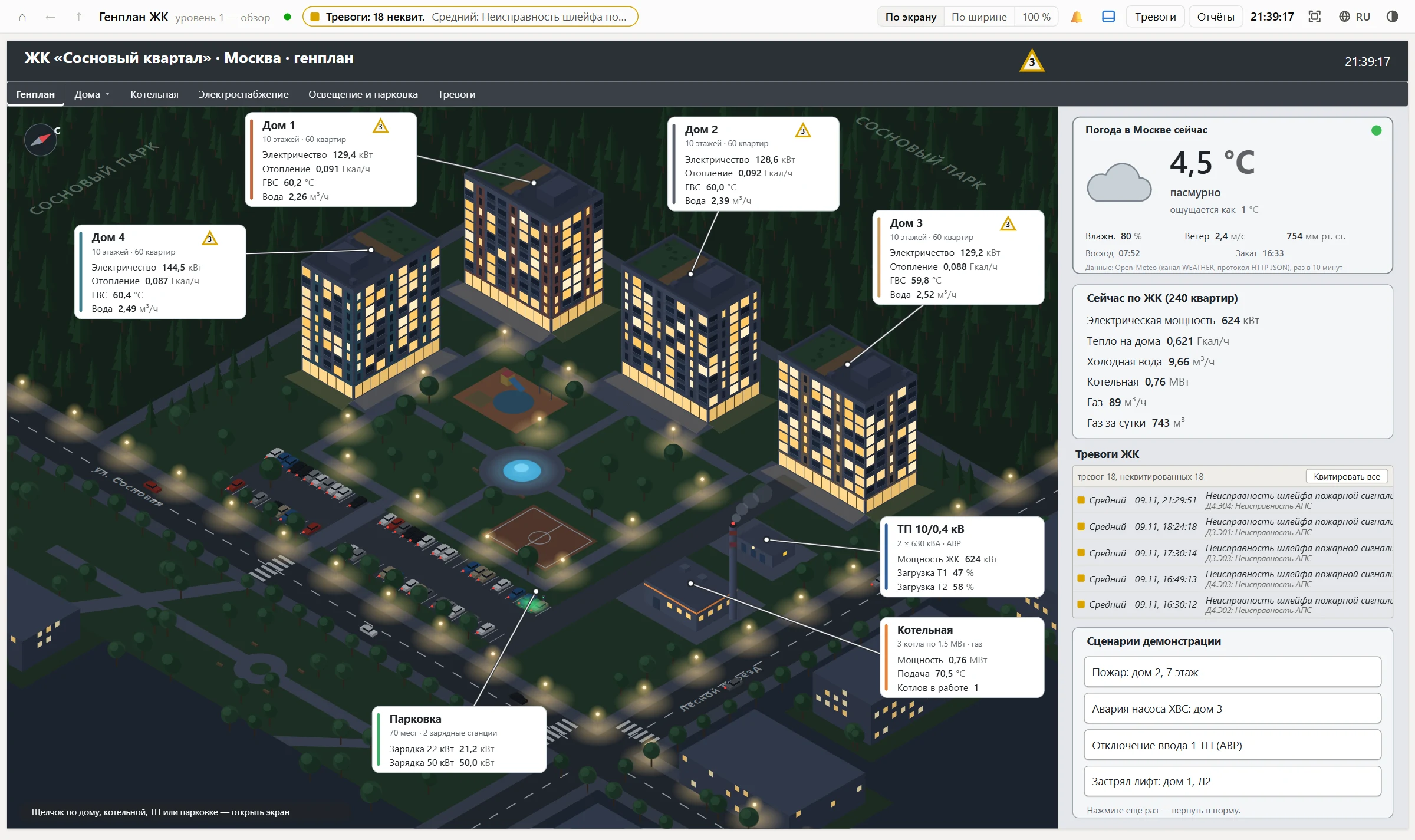
A live project: the “Pine Quarter” residential complex
A Flexible SCADA demo project: four 10-storey buildings, a boiler house, a transformer substation, lighting and parking — 126 objects. Values are computed by a C# program, while the outdoor temperature is real, from Moscow.
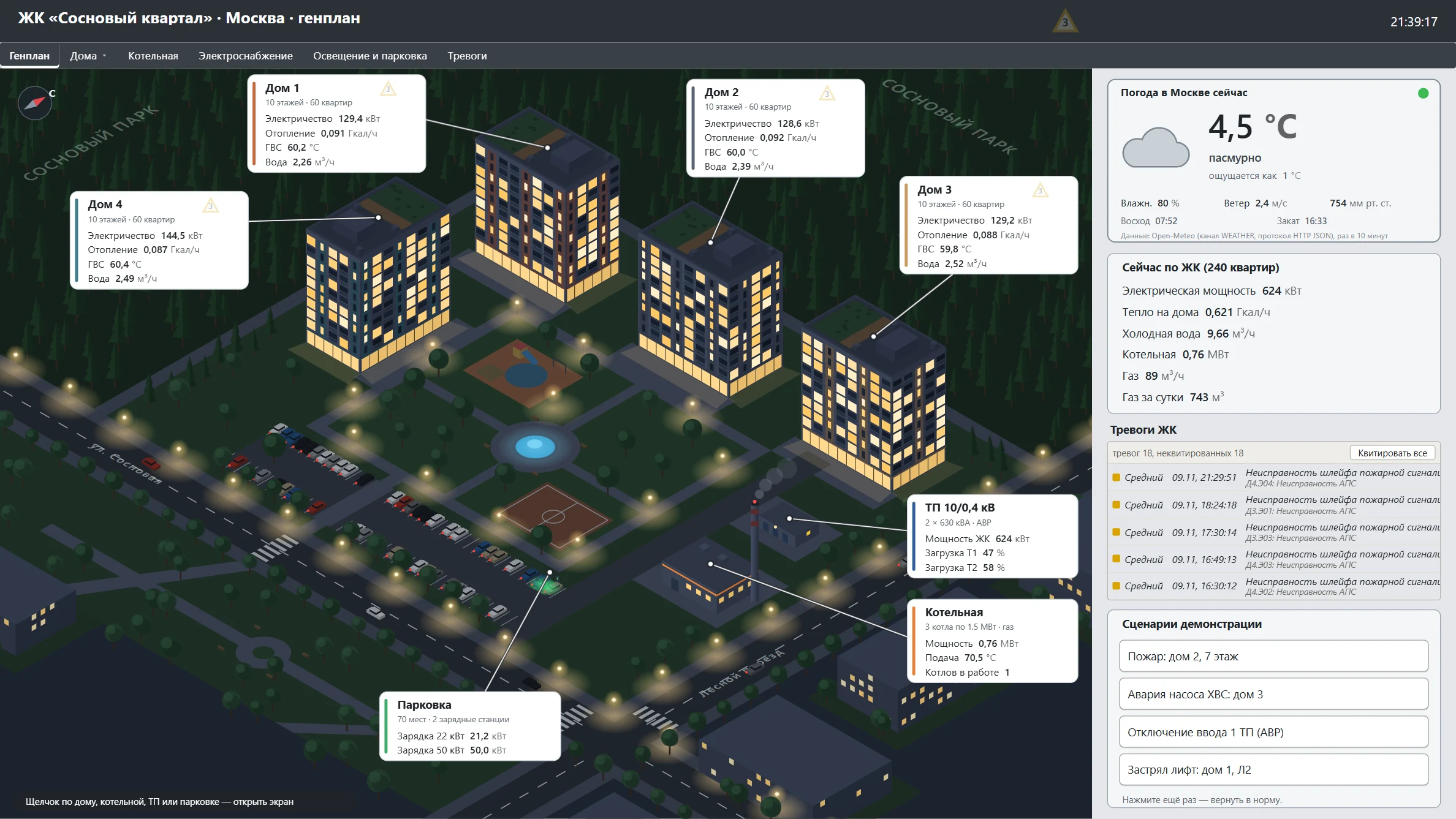
The numbers on the tabs are the ISA-101 screen level: from an overview of the whole site down to a single unit. Click a screenshot to enlarge it. The demo project itself is in Russian; the interface is available in 7 languages.
Everything a control room needs — in one product
Not a bundle of modules from different vendors, but one system: one project, one environment, one server.
HMI screens
A window editor with a grid, alignment and smart guides. Dynamics on any property, animation, SVG, embedded trends and alarm lists.
Element libraries
Seven standard libraries — ventilation, heating substations, boiler houses, wastewater treatment, warehouses and conveyors, pipelines, power supply. Elements snap together like building blocks.
Objects and types
A pump, a boiler, a floor — a type with tags, screens, alarms and reports. A hundred identical objects are created as a series, and bindings follow an address template.
ISA-18.2 alarms
Priorities, areas, acknowledgement, out-of-service with a reason, journal, sound. Flood and chattering-alarm metrics with hints on what to tune.
Historian and trends
A built-in compressed historian and trends from a minute to a year. Writing to PostgreSQL, MS SQL, ClickHouse and InfluxDB — including from several servers into one database.
Reports
Report templates on demand and on schedule — to Excel, HTML and PDF. A type report is built at once for every object of that type.
Programs
Logic in C#, ST and FBD (IEC 61131-3): on a timer or on tag changes. Live values on the FBD diagram, a VS Code extension.
Notifications
E-mail through your own mail server, Telegram with acknowledgement right from the chat, SMS through a gateway. Duty rosters and escalation when nobody responds.
Hot standby
A pair of servers: both poll the equipment and write the archive, one is active. On failure the role switches automatically and archive gaps are backfilled.
Security
HTTPS by default, roles and permissions, password policy, a tamper-evident audit log, encrypted channel passwords. Guided by IEC 62443.
OPC UA server
Project tags, the ISA-95 equipment model, history and alarms (Alarms & Conditions) — for MES, ERP and other upper-level systems.
Multiple servers Enterprise
Server overview and a shared alarm console, publishing a project to any server, installation over SSH and software updates over the network.
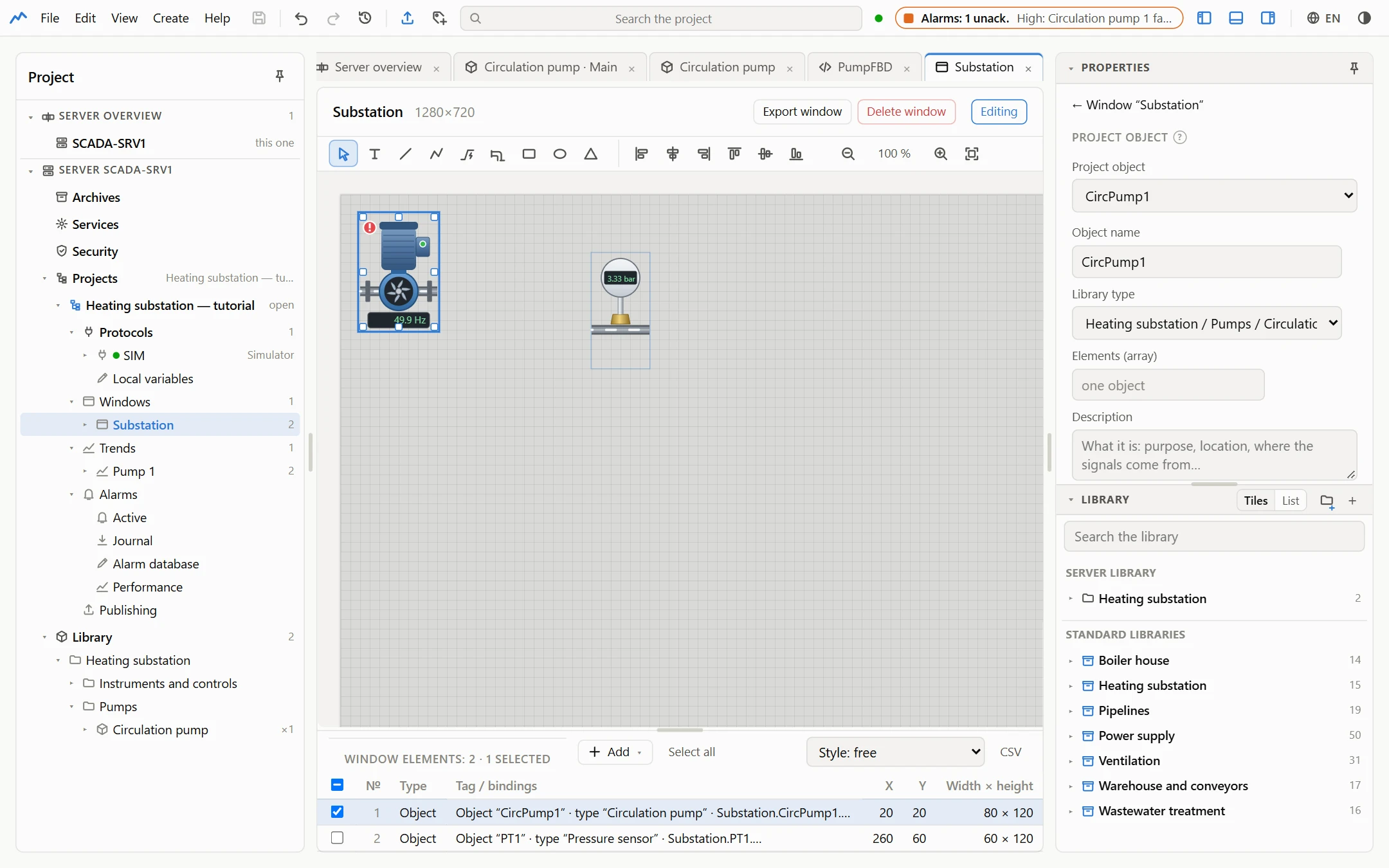
All engineering work in one window
The project tree, HMI editor, properties and type library sit side by side. Changes are validated and applied on the running server — polling never stops.
- Protocols, tags, windows, objects, trends, alarms and programs in one tree
- Edit properties of many elements at once, alignment, smart guides
- Change history and undo — including in the type library
- A project is one file: move it, back it up, publish it to a server
- Light and dark themes, help with examples at every step
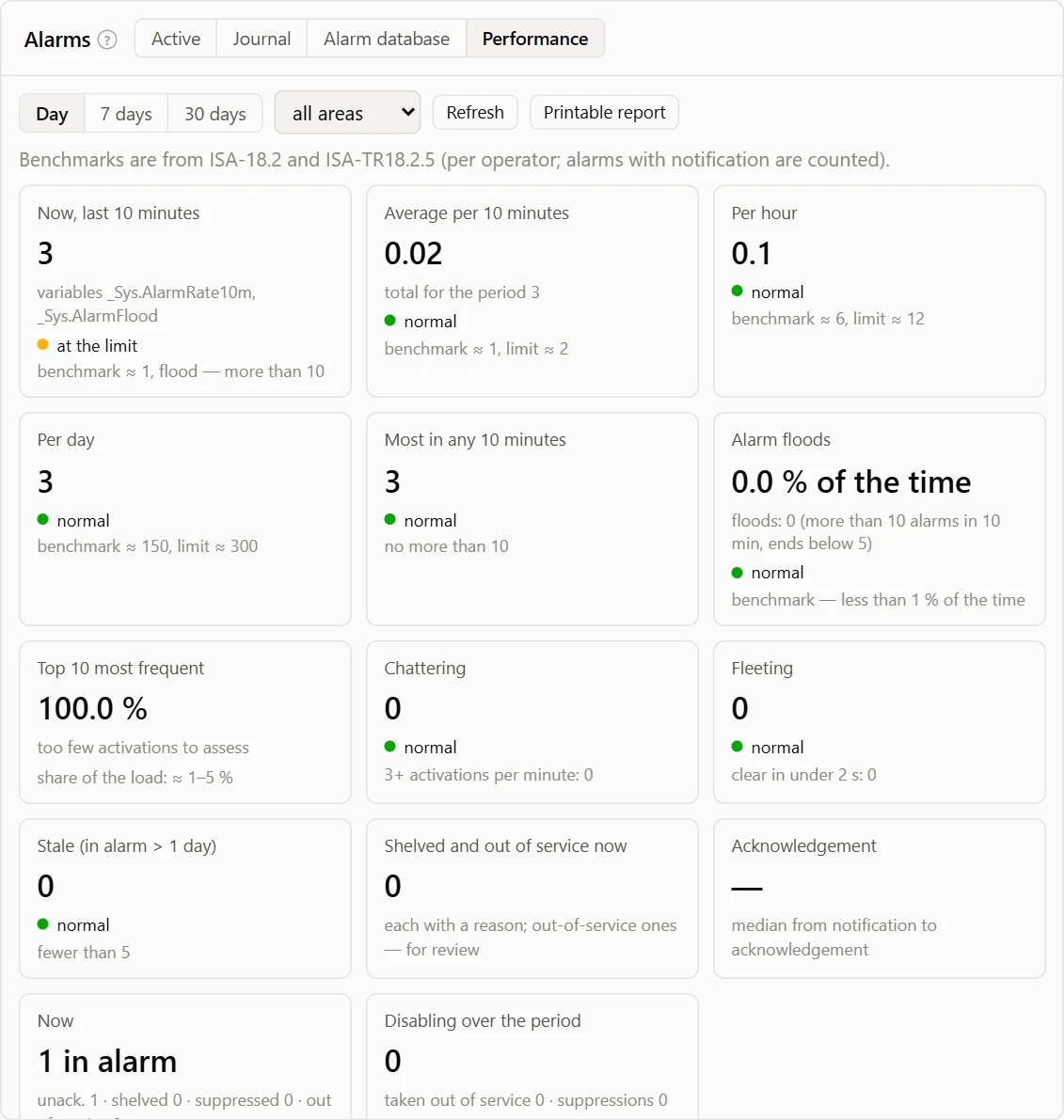
ISA-18.2 alarms — more than a list
Flexible SCADA helps you bring alarms under control: it counts floods, chattering and stale alarms, shows the most frequent ones and suggests where to add a delay or a deadband.
- Priorities and areas; acknowledge one, a selection or all
- Out-of-service and suppression with a stated reason; shelved alarms come up for review
- Define an alarm once in a type — every object gets its own
- A Telegram message with an “Acknowledge” button
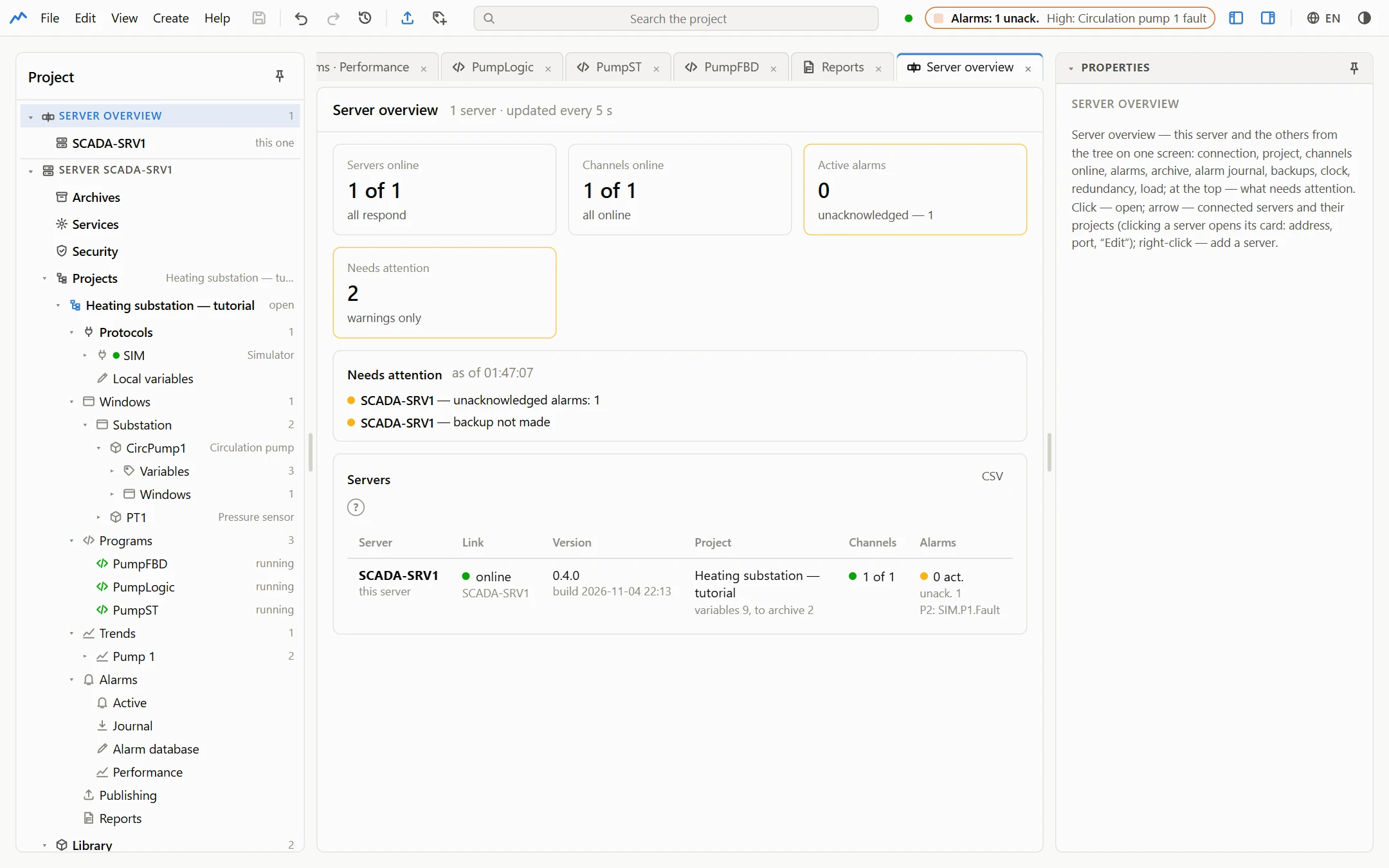
Dozens of sites, one control center
Connect site servers to a central one and see the connection, alarms, archive, backups, clock and load of each — on one screen. Whatever needs attention is at the top.
- Alarm console: alarms from all servers, acknowledged from one place
- Publish a project to any server — the site’s archive and alarms stay in place
- Install Flexible SCADA on a new computer over SSH — right from the IDE
- Server software updates over the network
PROGRAM Makeup
VAR
    Level AT 'BH.MUT.Level' : REAL; (* tank, % *)
    Pump  AT 'BH.MP.Run'    : BOOL; (* pump *)
    Low   : TON;
END_VAR

(* below 40 % for over 10 s: start,
   above 80 %: stop *)
Low(IN := Level < 40.0, PT := T#10s);
IF Low.Q THEN
    Pump := TRUE;
ELSIF Level > 80.0 THEN
    Pump := FALSE;
END_IF;
END_PROGRAM
// Program of the “Cold-water pumps” type:
// one code for the pump room of every building
public class PumpBackup : ScriptBase
{
    public override void Run()
    {
        double p = Tags["$Pressure"];        // bar
        bool fault = Tags["$P1.Fault"] > 0;

        // fault or pressure drop: start the standby pump
        if (fault || p < 3.0)
        {
            Tags["$P2.Start"] = 1;
            Warn($"{ObjectName}: standby on, P = {p:F2}");
        }
    }
}
Logic in the languages you already know
Programs run on the server, next to the data: on a timer, on a tag change or on a condition. A type program runs for every object of that type.
- ST and FBD per IEC 61131-3: timers, triggers, counters, standard functions
- C# — the full power of .NET for complex calculations and integrations
- Live values right on the FBD diagram
- Edit in the Flexible SCADA application or use code completion in VS Code
12 protocols — no OPC gateways or middlemen
The drivers are built into the server. Connection test and “read now” right in the channel form; errors in the protocol’s own terms.
Built on industry standards
We follow automation and industrial-security standards, so that Flexible SCADA projects are easier to review and hand over.
From a boiler house to a whole city
The same software runs on a small industrial PC and on a server with a million tags.
tags on one server: 1,880 PLCs over Modbus TCP and OPC UA, every channel online.
Load-test rig: 1.66 CPU cores, 11.4 GB of RAMto change a tag property in a 1.1M-tag project — no restart and no channel reconnects.
Same rig, applied on the serverof one core for 200,000 tags and 20,000 changes per second, with 5 subscribed clients.
Linux, 2 vCPUs, about 150 MB of RAMInstalls in minutes — even without internet
Everything you need is inside the installer; no separate .NET install. A site on an isolated network is the normal case, not the exception.
Windows
Windows 10, 11, Server 2016 or later, 64-bit.
- “All-in-one” and “server only” installers
- Windows service with automatic restart
- An app window for the engineer and offline help
Linux
Debian, Ubuntu, Astra Linux, RED OS, ALT, RHEL — x64 and ARM64.
- A .deb package or an archive with install.sh
- systemd service, menu
sudo webscada - Remote installation over SSH from the IDE
macOS
The development environment for Apple Silicon and Intel.
- A .dmg image, menus in the macOS menu bar
- Connects to site servers
- The IDE updates itself from the server
Start with one server
The edition is switched on in the server settings — nothing to reinstall. Pricing depends on your site: write to us.
Development environment
For engineers and integrators: build and maintain projects.
- Project, HMI screens, libraries, programs
- Built-in development server and simulator
- Offline help
Standard
A server for one site: a boiler house, a building, a workshop, a pumping station.
- All protocols, historian, alarms, reports, programs
- Operator screens in the browser
- Notifications, OPC UA server, external databases
- Hot standby and backups
Enterprise
A center for many sites: a facility management company, a water utility, a chain of buildings.
- Everything in Standard
- Server overview and a shared alarm console
- Publishing projects to other servers
- SSH installation and network updates
The interface speaks seven languages
Each user picks their own language: an operator on site and an engineer in another country work on the same project.
We’ll show Flexible SCADA on your site’s task
Tell us what needs to be automated: the equipment, the number of signals, how many sites. We’ll run a demo, help build a pilot project and work out the price.