The channel settings of every protocol and how a variable address is written. Fields and options are exactly as in the program windows; the “default” value is filled in by itself and can be left alone.
A channel is created with a right-click on the project → Create → Channel (protocol); choosing the protocol fills in the standard port, period and timeout.
Test connection — connect with the entered settings without saving anything.
The driver type can only be changed for a channel without variables.
Renaming a channel also renames its variables with the “Old.” prefix → “New.”, and the history, windows and trends move to the new names.
Deleting a channel deletes its variables too (with a question).
Modbus TCP
Modbus TCP is the most widespread protocol of PLCs, frequency converters, meters and I/O modules. Flexible SCADA is the client (master): it reads registers and coils, neighbouring addresses in one request.
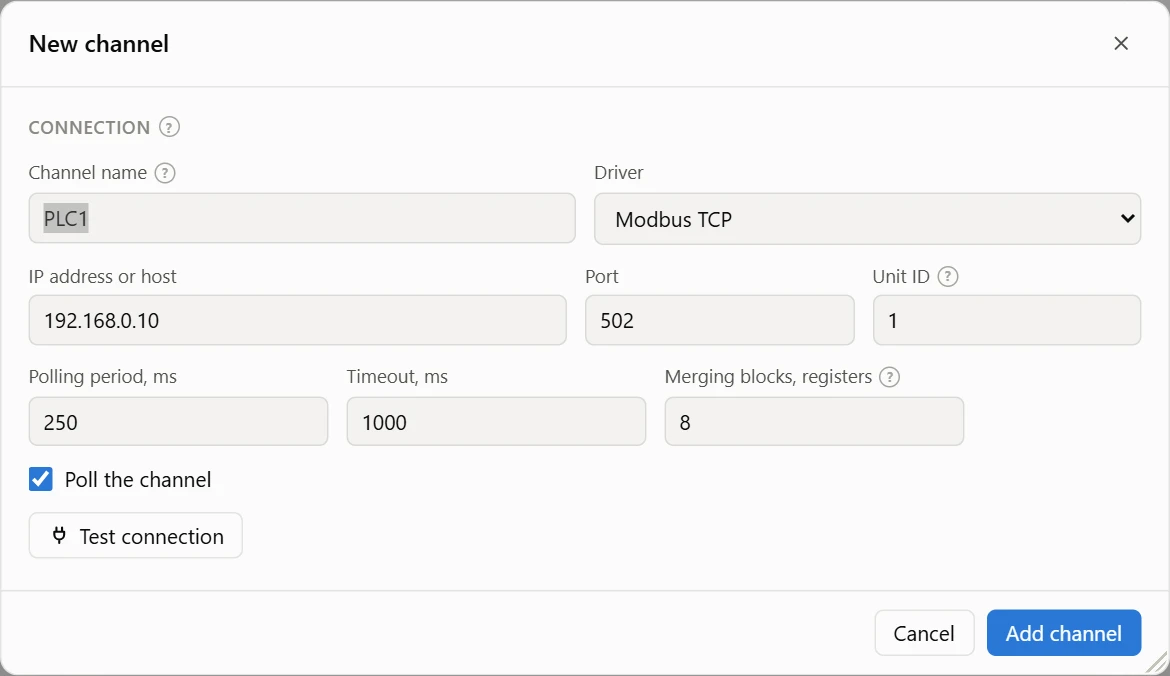
The Modbus TCP channel window.
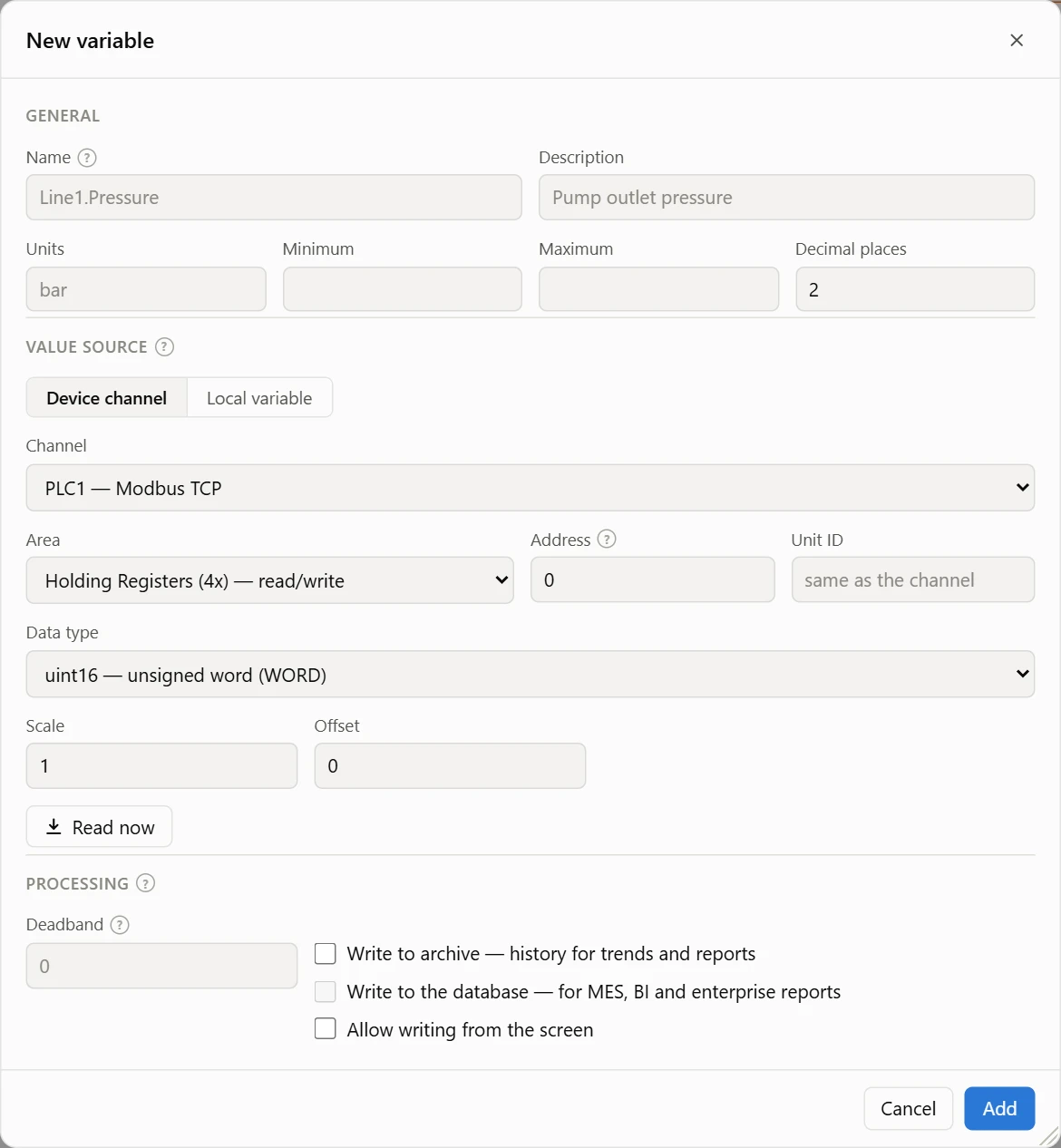
The window of a Modbus TCP channel variable.
Channel settings
Parameter
Values
Meaning
Connection
IP address or host
text e.g. 192.168.0.10
The device address on the network: 192.168.0.10 or a host name.
Port
number502· default
The TCP or UDP port of the protocol; the default is the protocol standard one (filled in when the driver is chosen).
Unit ID
number1· default
slave address, 0…255
Polling period, ms
number250· default
How often to read all variables of the channel. Smaller — fresher values, but more load on the network and the PLC.
Timeout, ms
number1000· default
How long to wait for an answer. No answer — a communication error and a reconnection.
Merging blocks, registers
number8· default
gap still read in one request
Poll the channel
checkbox on · default
Off — the channel does not connect (during commissioning or repairs); its variables have Bad quality.
uint16 — unsigned word (WORD) · defaultint16 — signed word (INT)uint32 — 2 registers (DWORD)int32 — 2 registers (DINT)float32 — 2 registers (REAL)float64 — 4 registers (LREAL)bool — bit in a register
How to read the value. “By address” — by the size letter or the device data.
Scale
number1· default
Engineering value = raw × scale + offset.
Offset
number0· default
Added after the scale.
Area
Modicon number
What it is
Writable
Holding Registers
4x (40001…)
16-bit registers: setpoints, values
yes
Input Registers
3x (30001…)
read-only 16-bit registers: measurements
no
Coils
0x (00001…)
digital outputs
yes
Discrete Inputs
1x (10001…)
digital inputs
no
Address — a zero-based number inside the area (the hint next to it shows the Modicon number: Holding address 0 is 40001). Types of 2 and 4 registers are read in a row; the byte order depends on the device: ABCD is the Modbus standard, CDAB — swapped words (common on PLCs), BADC and DCBA — rarer. If a value jumps by orders of magnitude — change the byte order.
OPC UA
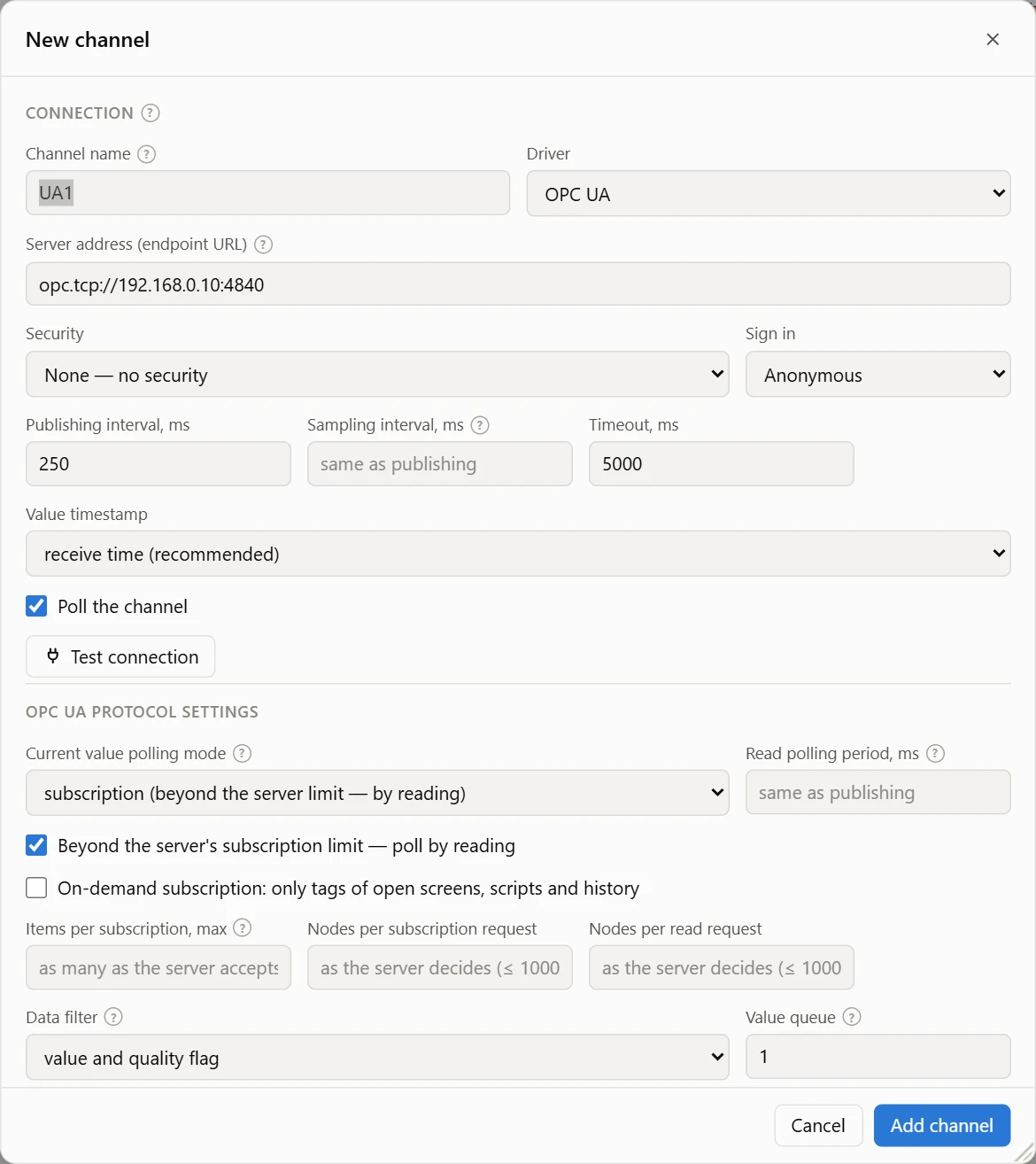
OPC UA — a client for OPC UA servers: Siemens S7-1500, CODESYS, Beckhoff, Kepware and others. Values arrive by subscription; beyond the server subscription limit — by reading. Secure connections (Sign, Sign & Encrypt) need mutual certificate trust: the Test connection button shows the server certificate and offers to trust it; the Flexible SCADA certificate for the server is downloaded there too.
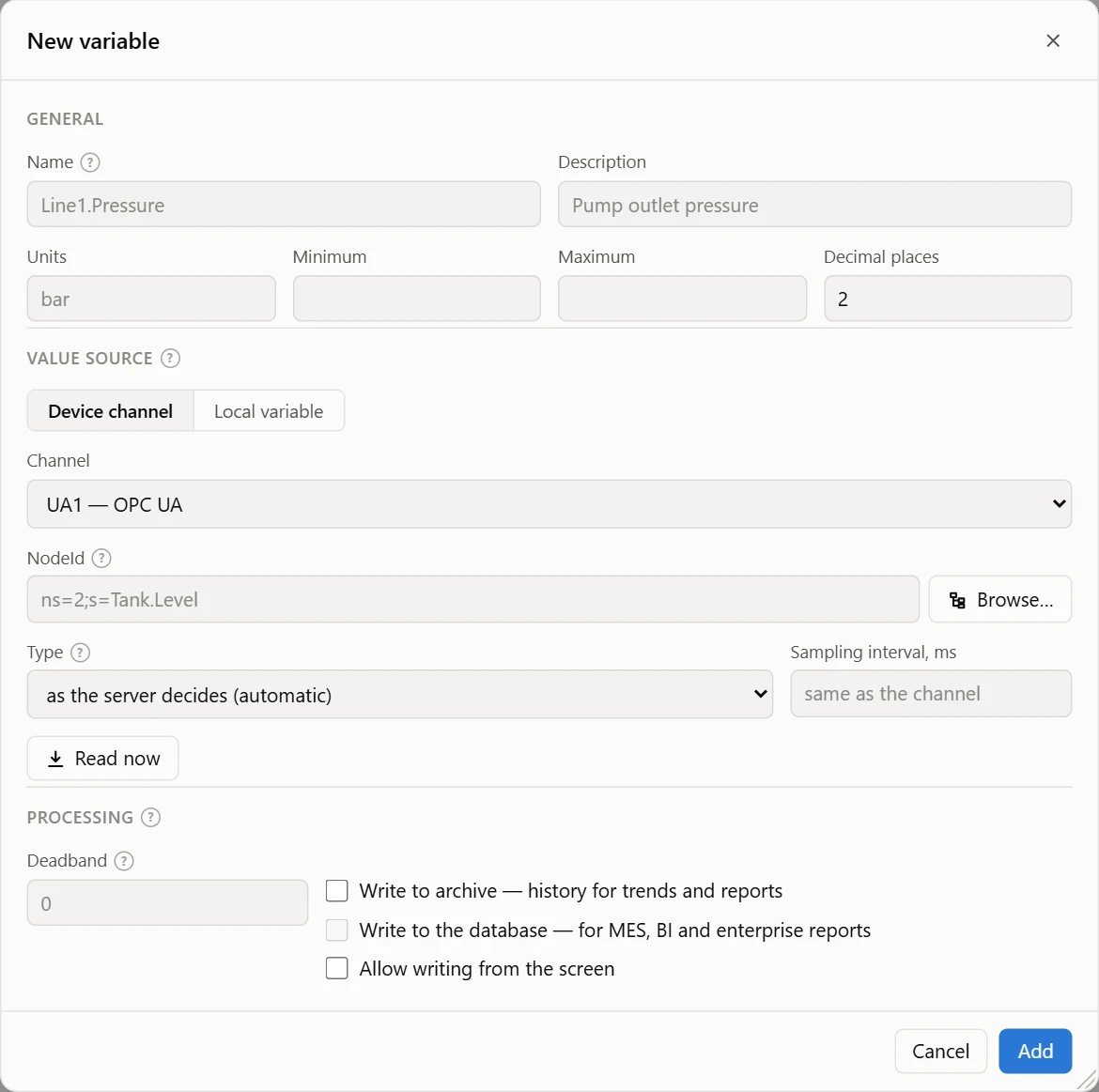
The Browse… button in the variable window opens the server address space: pick nodes — variables are created with the NodeId, type and description.
how often the server checks the value Empty — same as publishing.
Timeout, ms
number5000· default
How long to wait for an answer. No answer — a communication error and a reconnection.
Value timestamp
receive time (recommended) · defaultsource time (PLC clock)OPC UA server time
Poll the channel
checkbox on · default
Off — the channel does not connect (during commissioning or repairs); its variables have Bad quality.
OPC UA protocol settings
Current value polling mode
subscription (beyond the server limit — by reading) · defaultread only (cyclic polling)
subscription — the server sends changes itself; reading — all values are requested at the polling period
Read polling period, ms
number
“read” mode and tags beyond the limit Empty — same as publishing.
Beyond the server's subscription limit — poll by reading
checkbox on · default
A PLC's subscription item limit is usually shared by the whole server and divided among all clients. Off — tags beyond the limit get status BadTooManyMonitoredItems and the subscription is retried at the resubscribe period.
On-demand subscription: only tags of open screens, scripts and history
checkbox off · default
The server monitors only tags of open screens and scripts (UI subscription), and always tags with history (background subscription). When a screen is closed, its tags are removed from the server; other tags are not polled and keep their last value. Helps when a PLC has few subscription items.
Items per subscription, max
number
beyond — the next subscription Empty — as many as the server accepts.
Nodes per subscription request
number
Nodes per read request
number
Data filter
value and quality flag · defaultquality flag onlyvalue, quality and timestamp
what the server considers a change
Value queue
number1· default
item values between publications
Resubscribe period, s
number60· default
retry for tags the server did not accept; 0 — do not retry
Subscription timeout, ms
number
how long the server keeps a subscription without connection
Session timeout, ms
number60000· default
how long the server keeps a session after a disconnect
Variable address
Parameter
Values
Meaning
NodeId
text e.g. ns=2;s=Tank.Level
ns=3;s="DB1"."Temp" · ns=2;i=1001 · nsu=urn:…;s=… — or pick it in the browser
Type
as the server decides (automatic) · defaultBooleanInt16 / SByteUInt16 / ByteInt32 / EnumerationUInt32Int64UInt64FloatDoubleString / LocalizedText
Sampling interval, ms
number
Empty — same as the channel.
Siemens S7
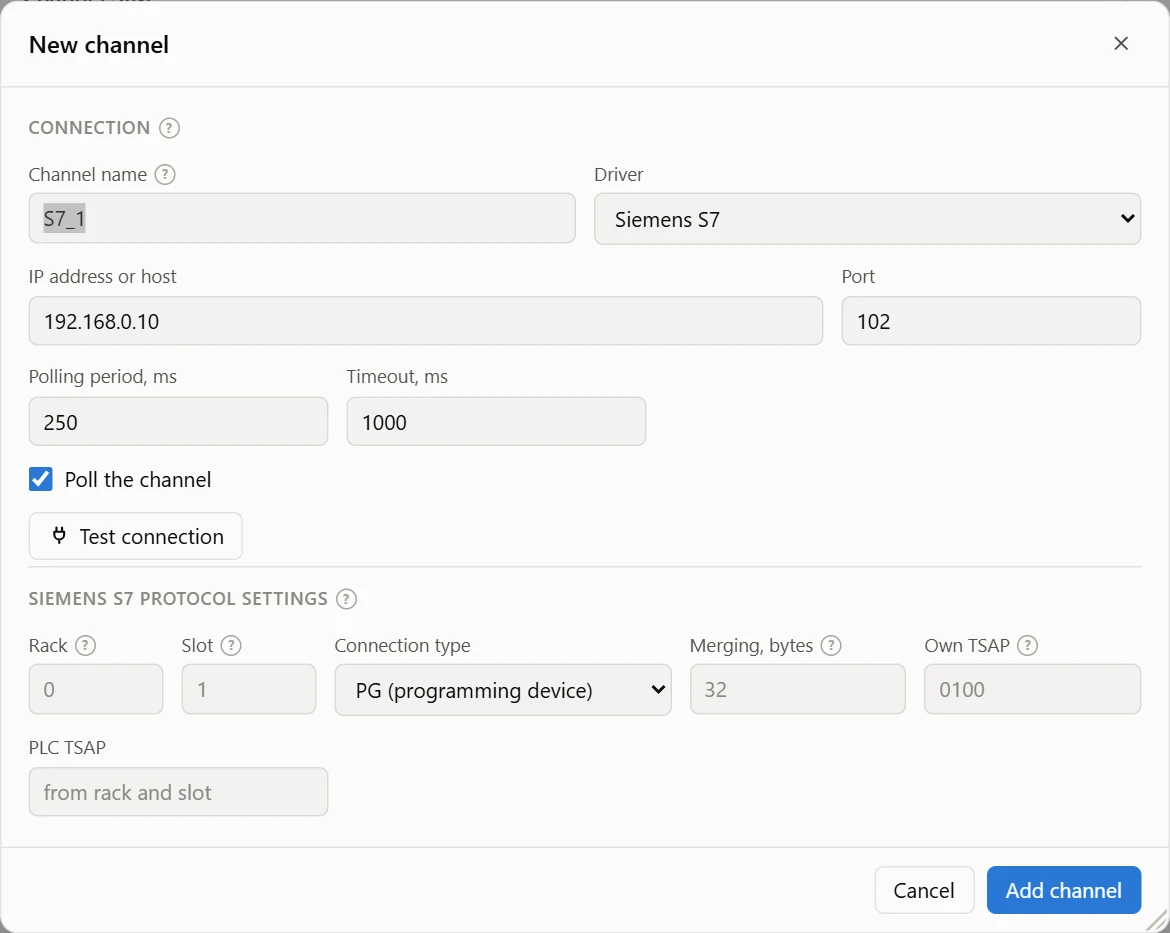
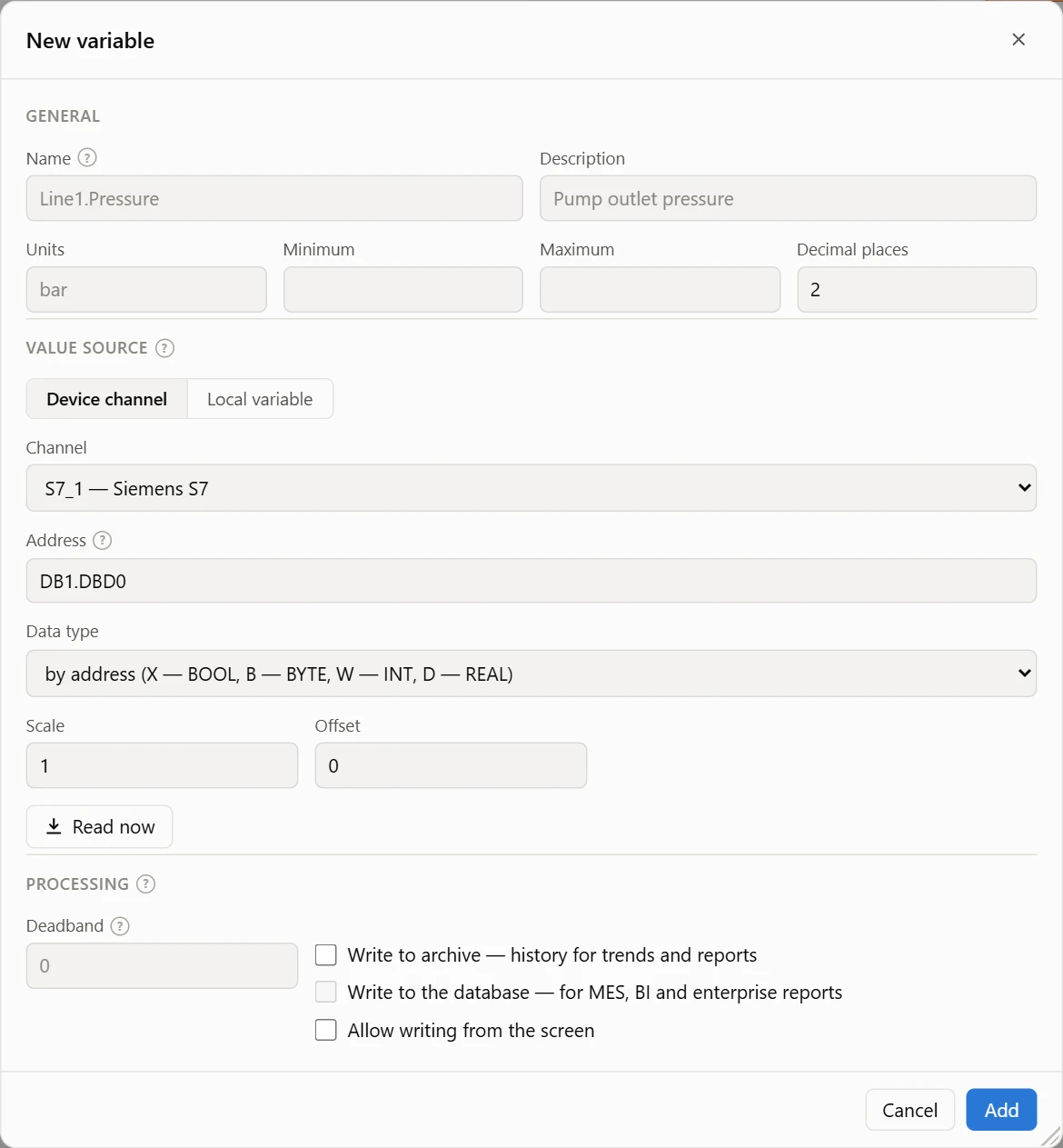
Siemens S7 over ISO-on-TCP: S7-300/400/1200/1500, ET200SP, LOGO! 8, S7-200 SMART. On S7-1200/1500 allow PUT/GET access in the CPU properties and clear “Optimized block access” on the data blocks. A data block can be imported from TIA Portal (a .db source) — variables are created from the block structure.
The Siemens S7 channel window.
The window of a Siemens S7 channel variable.
Channel settings
Parameter
Values
Meaning
Connection
IP address or host
text e.g. 192.168.0.10
The device address on the network: 192.168.0.10 or a host name.
Port
number102· default
The TCP or UDP port of the protocol; the default is the protocol standard one (filled in when the driver is chosen).
Polling period, ms
number250· default
How often to read all variables of the channel. Smaller — fresher values, but more load on the network and the PLC.
Timeout, ms
number1000· default
How long to wait for an answer. No answer — a communication error and a reconnection.
Poll the channel
checkbox on · default
Off — the channel does not connect (during commissioning or repairs); its variables have Bad quality.
by address (X — BOOL, B — BYTE, W — INT, D — REAL) · defaultBOOLINT (int16)UINT / WORD (uint16)DINT (int32)UDINT / DWORD (uint32)LINT (int64)ULINT (uint64)REAL (float32)LREAL (float64)STRING
How to read the value. “By address” — by the size letter or the device data.
Scale
number1· default
Engineering value = raw × scale + offset.
Offset
number0· default
Added after the scale.
Address
What it is
Default type
DB1.DBX0.0
bit 0 of byte 0 of data block 1
BOOL
DB1.DBB2
byte 2
BYTE
DB1.DBW4
a word (2 bytes) from byte 4
INT
DB1.DBD6
a double word from byte 6
REAL
DB1.DBS10.20
a STRING[20] from byte 10
STRING
M0.1, MW10
markers
BOOL / INT
I0.0 / E0.0
inputs (read-only)
BOOL
Q0.0 / A0.0
outputs
BOOL
The type is defined by the size letter; for DINT, DWORD, LREAL set the type explicitly.
IEC 60870-5-104
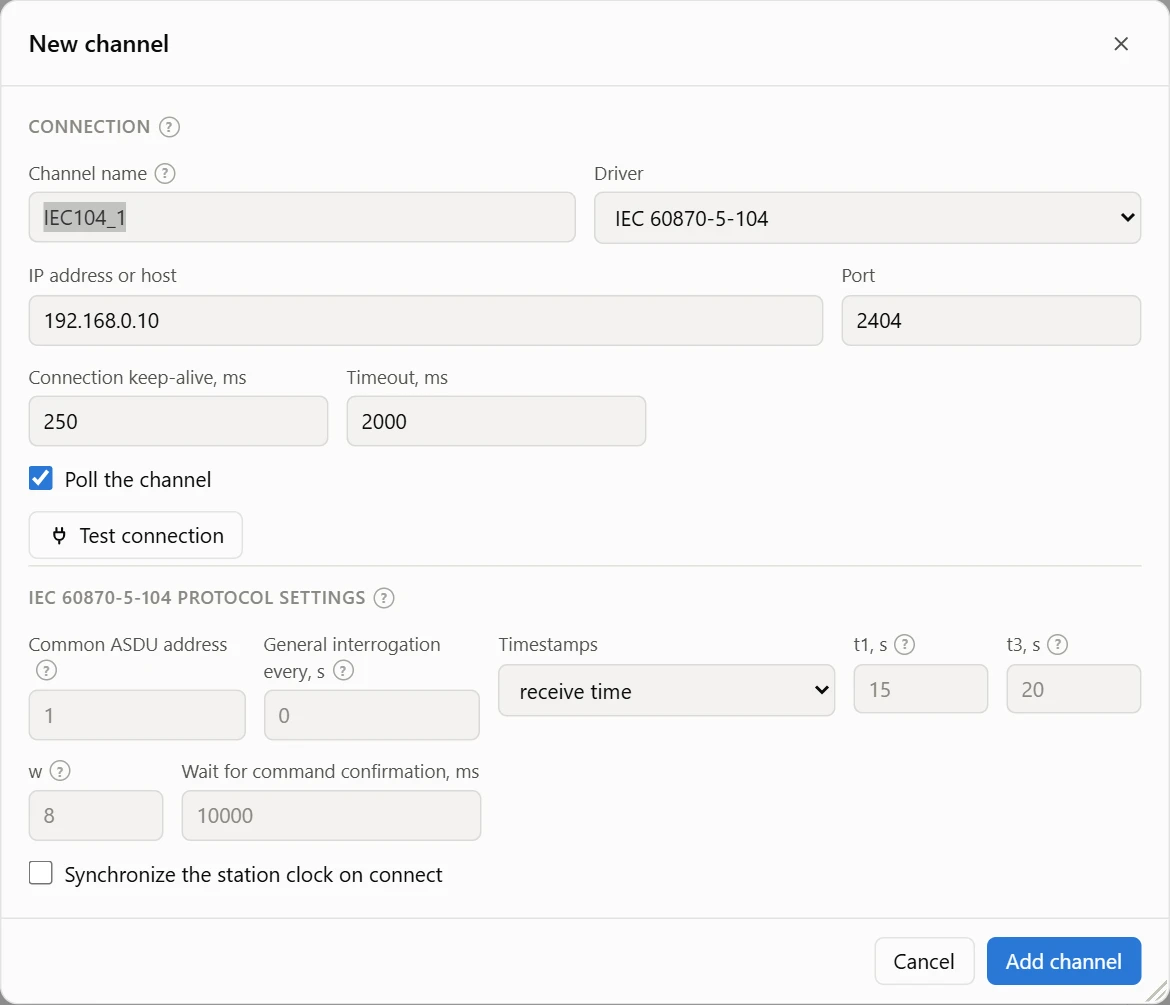
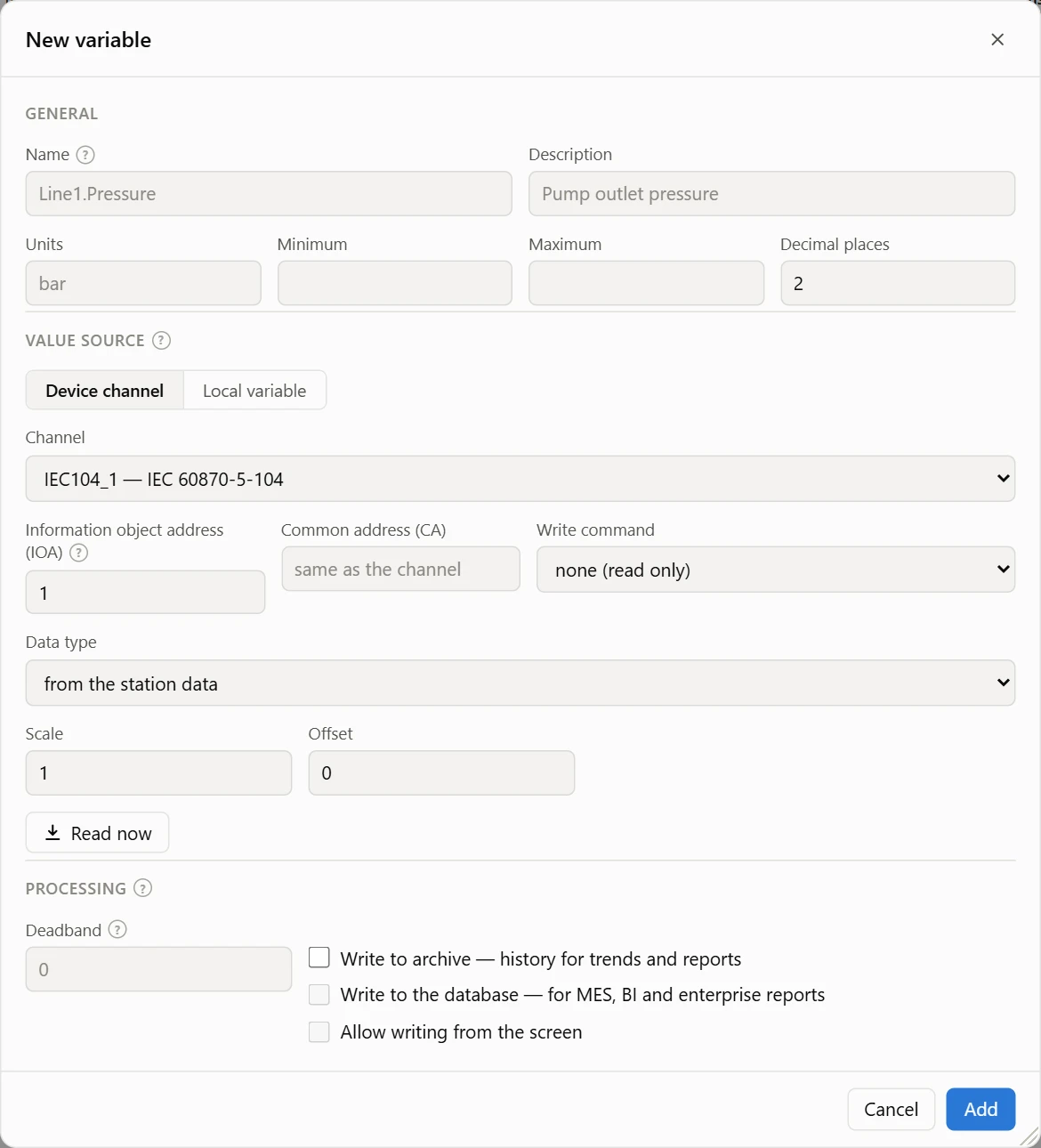
IEC 60870-5-104 — power telecontrol. Flexible SCADA is the controlling station: after connecting it makes a general interrogation, then values arrive spontaneously. Commands are confirmed (ACT_CON), optionally with select-before-operate (SBO).
The IEC 60870-5-104 channel window.
The window of a IEC 60870-5-104 channel variable.
Channel settings
Parameter
Values
Meaning
Connection
IP address or host
text e.g. 192.168.0.10
The device address on the network: 192.168.0.10 or a host name.
Port
number2404· default
The TCP or UDP port of the protocol; the default is the protocol standard one (filled in when the driver is chosen).
Connection keep-alive, ms
number250· default
This protocol delivers values by itself; the period only serves connection checks and service traffic.
Timeout, ms
number2000· default
How long to wait for an answer. No answer — a communication error and a reconnection.
Poll the channel
checkbox on · default
Off — the channel does not connect (during commissioning or repairs); its variables have Bad quality.
IEC 60870-5-104 protocol settings
Common ASDU address
number1· default
a variable can have another (ca)
General interrogation every, s
number0· default
0 — only on connect
Timestamps
receive time · defaultstation timestamp (UTC)station timestamp (local)
from the station data · defaultBOOLINT (int16)UINT / WORD (uint16)DINT (int32)UDINT / DWORD (uint32)LINT (int64)ULINT (uint64)REAL (float32)LREAL (float64)
How to read the value. “By address” — by the size letter or the device data.
Scale
number1· default
Engineering value = raw × scale + offset.
Offset
number0· default
Added after the scale.
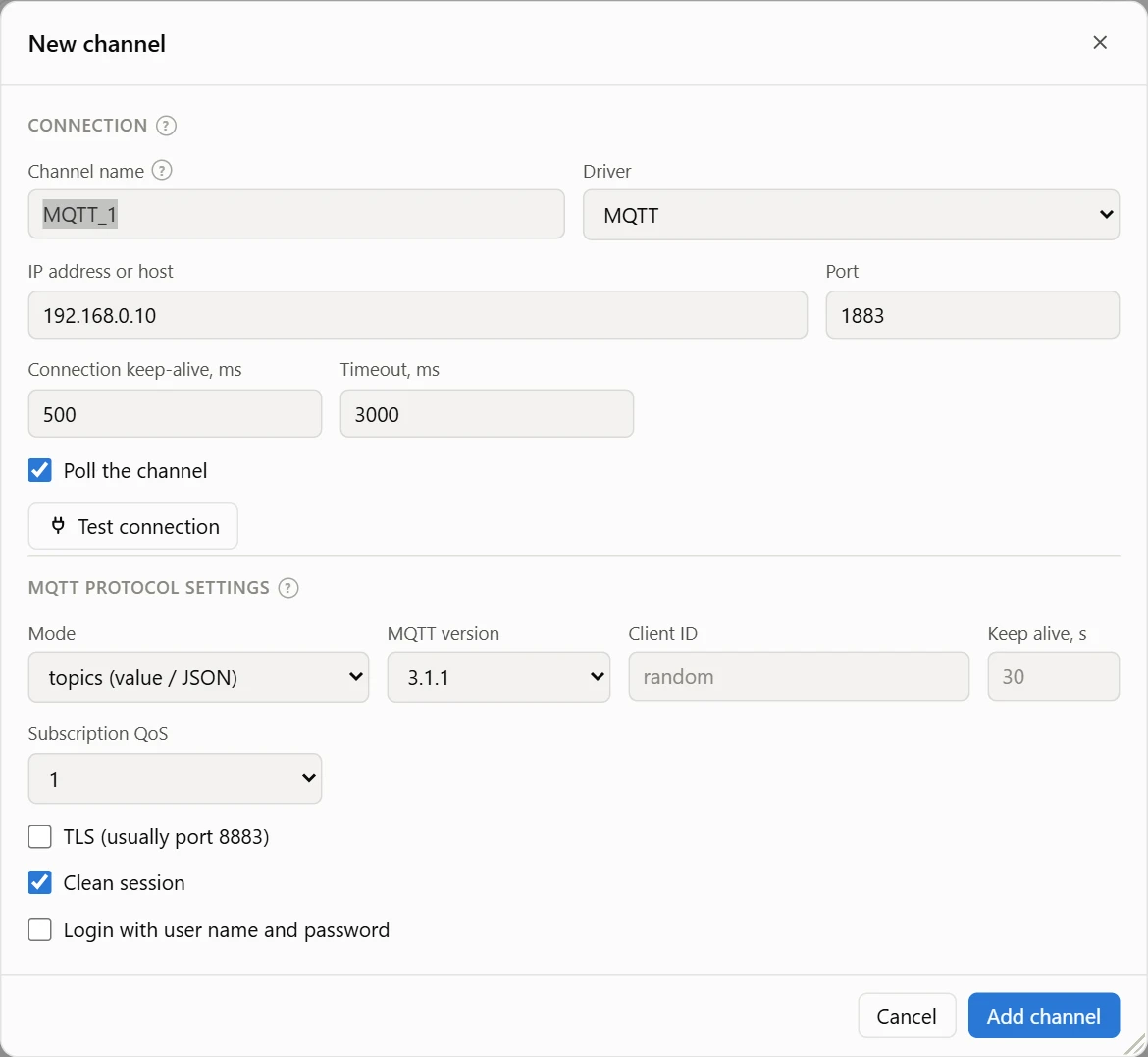
MQTT
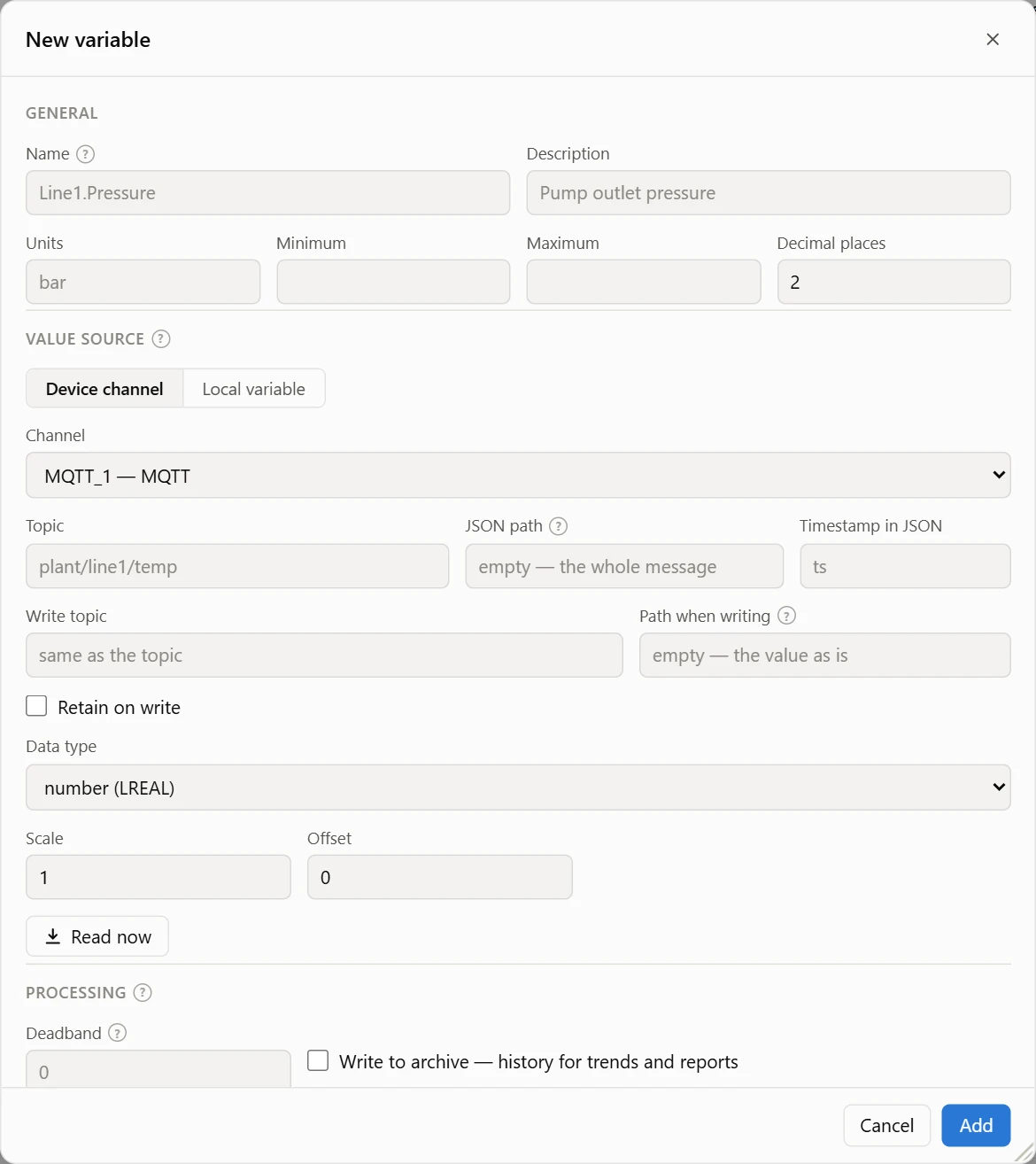
MQTT 3.1.1 and 5: IoT sensors, gateways, controllers with MQTT. Values arrive by subscription. The topics mode — a value in the message (“21.5”, “true”) or at a JSON path; the Sparkplug B mode — node metrics by their BIRTH / DATA / DEATH, writing — with a DCMD/NCMD command.
The MQTT channel window.
The window of a MQTT channel variable.
Channel settings
Parameter
Values
Meaning
Connection
IP address or host
text e.g. 192.168.0.10
The device address on the network: 192.168.0.10 or a host name.
Port
number1883· default
The TCP or UDP port of the protocol; the default is the protocol standard one (filled in when the driver is chosen).
Connection keep-alive, ms
number500· default
This protocol delivers values by itself; the period only serves connection checks and service traffic.
Timeout, ms
number3000· default
How long to wait for an answer. No answer — a communication error and a reconnection.
Poll the channel
checkbox on · default
Off — the channel does not connect (during commissioning or repairs); its variables have Bad quality.
MQTT protocol settings
Mode
topics (value / JSON) · defaultSparkplug B
MQTT version
3.1.1 · default5
Client ID
text
Empty — random.
Keep alive, s
number30· default
Subscription QoS
01 · default2
TLS (usually port 8883)
checkbox off · default
Clean session
checkbox on · default
Login with user name and password
checkbox off · default
The broker or server requires a login and password; the password is stored in the project encrypted.
{"data":{"sp":7}} — data.sp Empty — empty — the value as is.
Retain on write
checkbox off · default
Data type
number (LREAL) · defaultBOOLINT (int16)UINT / WORD (uint16)DINT (int32)UDINT / DWORD (uint32)LINT (int64)ULINT (uint64)REAL (float32)LREAL (float64)STRING
How to read the value. “By address” — by the size letter or the device data.
Scale
number1· default
Engineering value = raw × scale + offset.
Offset
number0· default
Added after the scale.
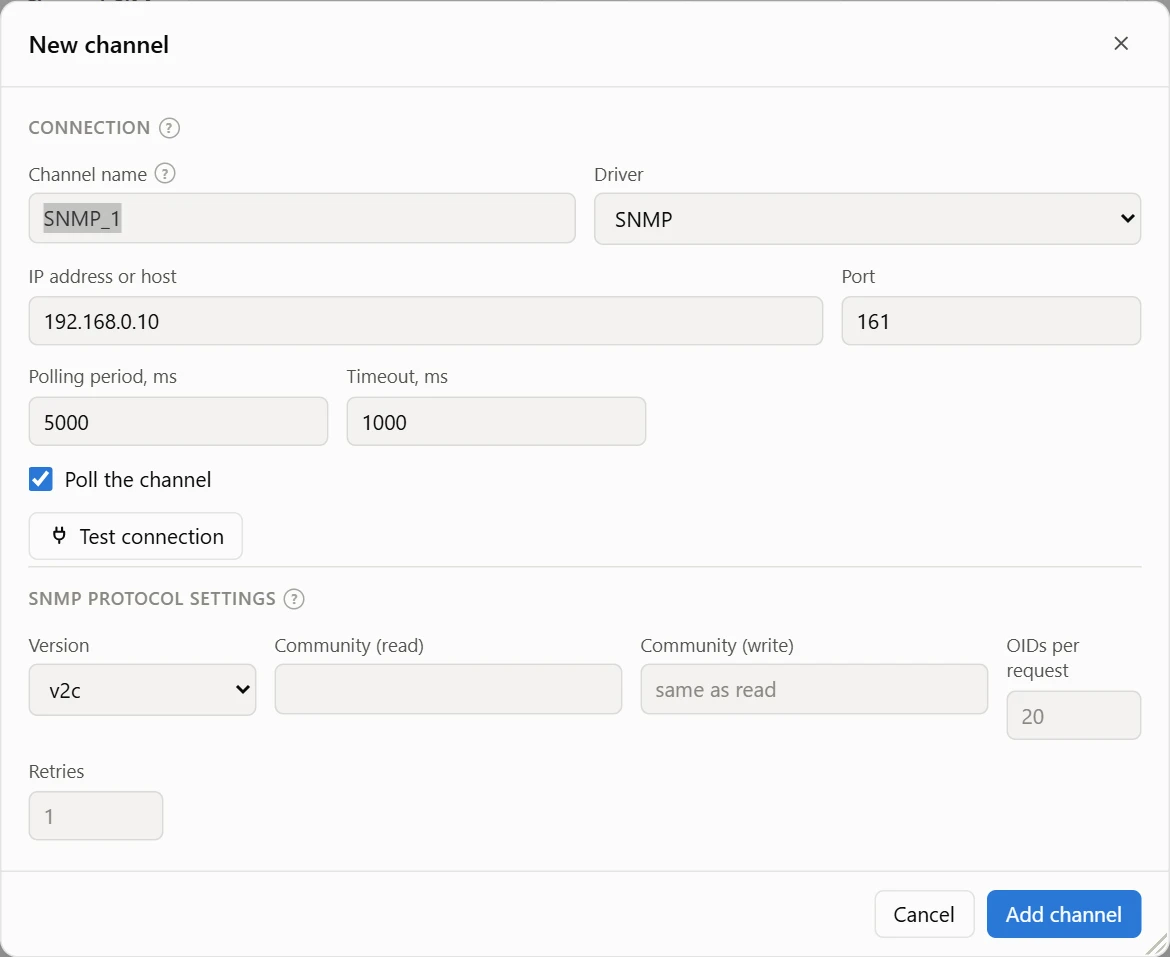
SNMP
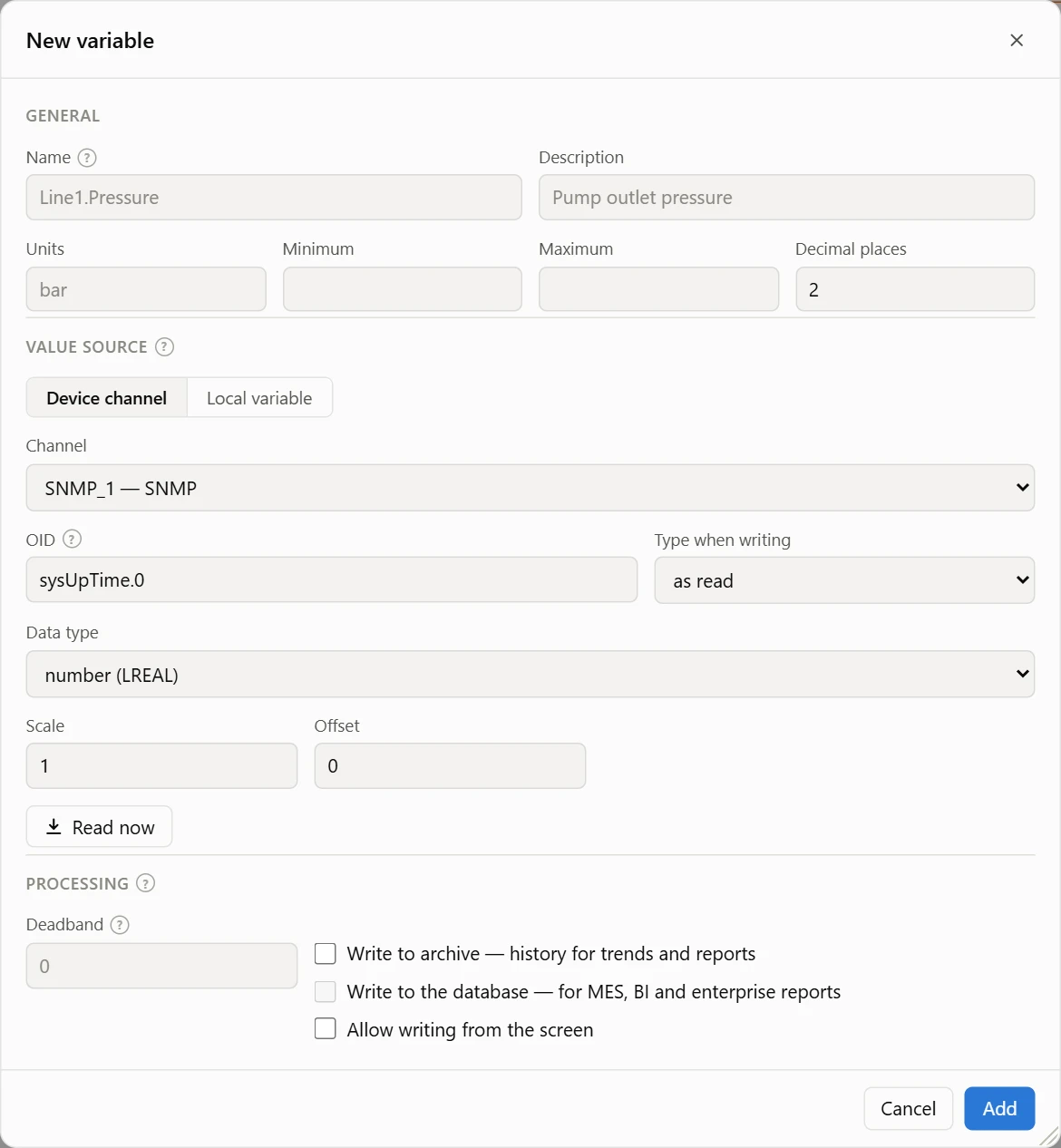
SNMP v1, v2c, v3: switches, UPSs, air conditioners, PDUs. An OID — as a number or a MIB-2 name (sysUpTime.0, ifInOctets.1). v3 — user, authentication and encryption; communities and passwords are encrypted in the project.
The SNMP channel window.
The window of a SNMP channel variable.
Channel settings
Parameter
Values
Meaning
Connection
IP address or host
text e.g. 192.168.0.10
The device address on the network: 192.168.0.10 or a host name.
Port
number161· default
The TCP or UDP port of the protocol; the default is the protocol standard one (filled in when the driver is chosen).
Polling period, ms
number5000· default
How often to read all variables of the channel. Smaller — fresher values, but more load on the network and the PLC.
Timeout, ms
number1000· default
How long to wait for an answer. No answer — a communication error and a reconnection.
Poll the channel
checkbox on · default
Off — the channel does not connect (during commissioning or repairs); its variables have Bad quality.
SNMP protocol settings
Version
v2c · defaultv1v3
Community (read)
text
Community (write)
text
Empty — same as read.
OIDs per request
number20· default
Retries
number1· default
Variable address
Parameter
Values
Meaning
OID
text e.g. 1.3.6.1.2.1.1.3.0
or a MIB-2 name: sysUpTime.0, ifInOctets.1, upsOutputPercentLoad.1
Type when writing
as read · defaultINTEGERGauge32Counter32TimeTicksOCTET STRINGIpAddress
Data type
number (LREAL) · defaultBOOLINT (int16)UINT / WORD (uint16)DINT (int32)UDINT / DWORD (uint32)LINT (int64)ULINT (uint64)REAL (float32)LREAL (float64)STRING
How to read the value. “By address” — by the size letter or the device data.
Scale
number1· default
Engineering value = raw × scale + offset.
Offset
number0· default
Added after the scale.
BACnet/IP
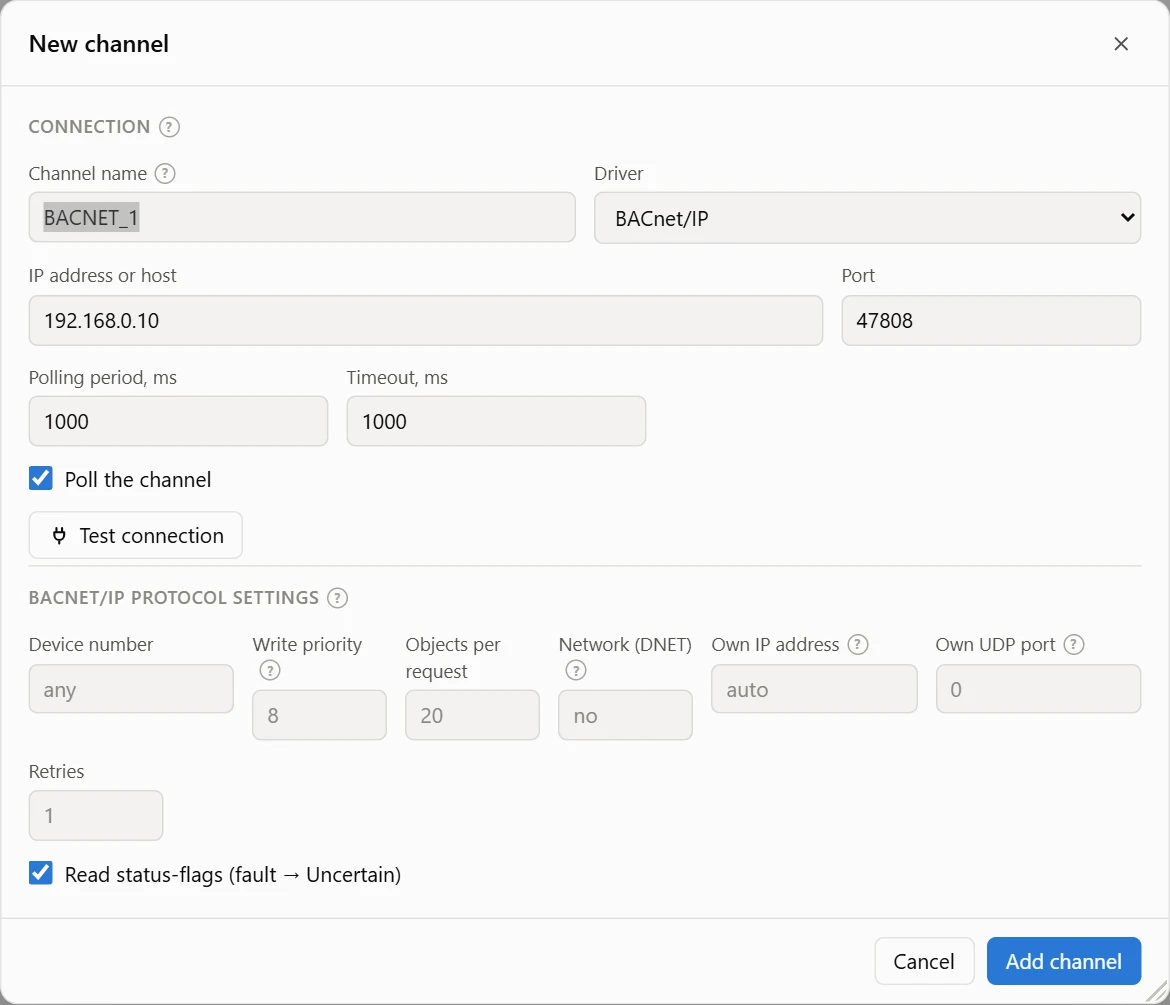
BACnet/IP — building controllers (UDP 47808): reading with ReadPropertyMultiple, present-value together with status-flags (a fault gives Uncertain quality); writing — with a priority.
The BACnet/IP channel window.
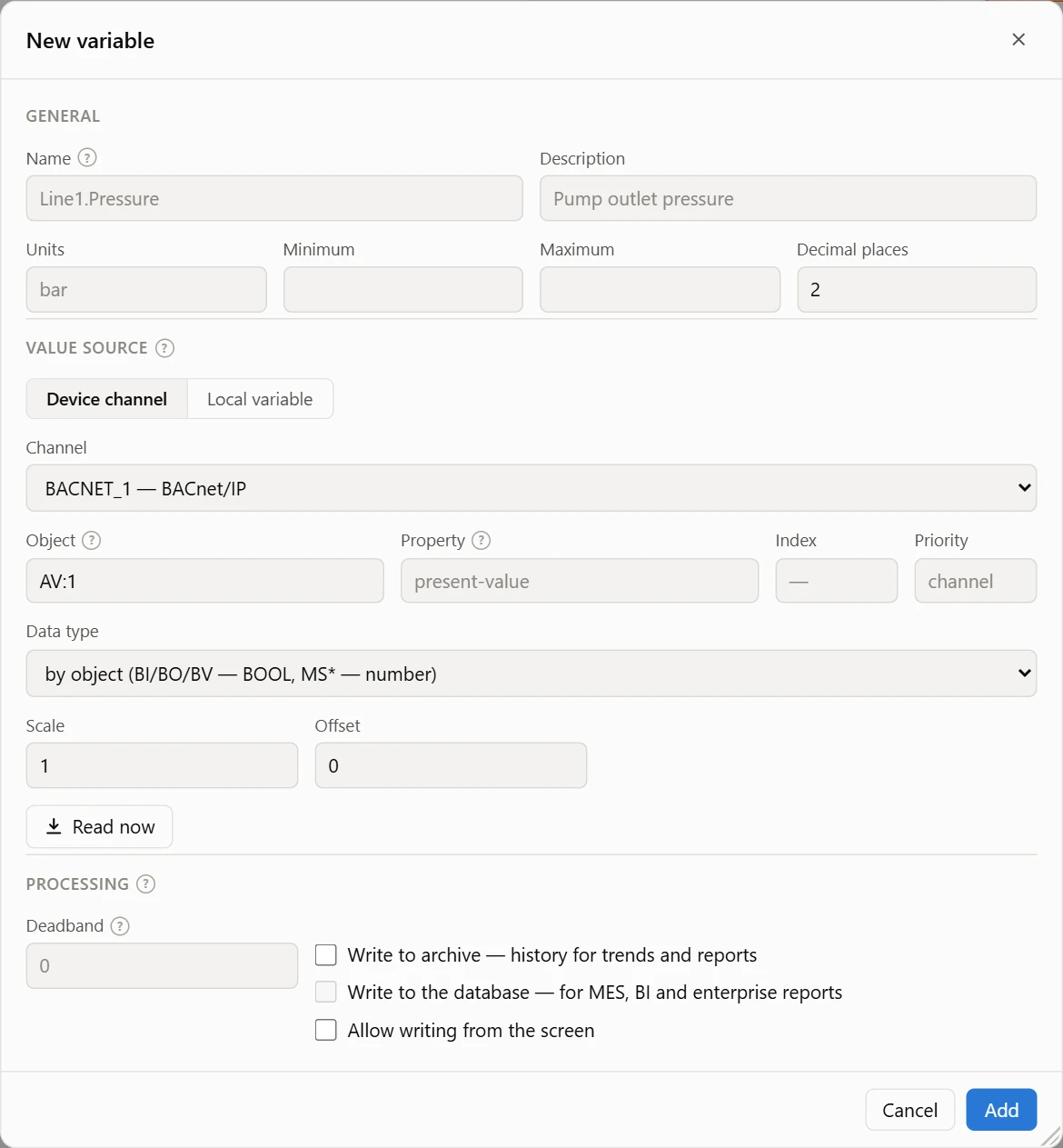
The window of a BACnet/IP channel variable.
Channel settings
Parameter
Values
Meaning
Connection
IP address or host
text e.g. 192.168.0.10
The device address on the network: 192.168.0.10 or a host name.
Port
number47808· default
The TCP or UDP port of the protocol; the default is the protocol standard one (filled in when the driver is chosen).
Polling period, ms
number1000· default
How often to read all variables of the channel. Smaller — fresher values, but more load on the network and the PLC.
Timeout, ms
number1000· default
How long to wait for an answer. No answer — a communication error and a reconnection.
Poll the channel
checkbox on · default
Off — the channel does not connect (during commissioning or repairs); its variables have Bad quality.
BACnet/IP protocol settings
Device number
number
Empty — any.
Write priority
number8· default
1…16; 8 — operator
Objects per request
number20· default
Network (DNET)
number
device behind an MS/TP router Empty — no.
Own IP address
text
on a PC with several networks — the address in the device network Empty — auto.
Own UDP port
number0· default
0 — any; 47808 — if the device answers only on it
Retries
number1· default
Read status-flags (fault → Uncertain)
checkbox on · default
Variable address
Parameter
Values
Meaning
Object
text e.g. AI:1
AI, AO, AV, BI, BO, BV, MSI, MSO, MSV, IV, CSV, DEV — and a number
Property
text e.g. present-value
object-name, status-flags, units… or a number Empty — present-value.
by address (bit — BOOL, word — INT) · defaultBOOLINT (int16)UINT / WORD (uint16)DINT (int32)UDINT / DWORD (uint32)LINT (int64)ULINT (uint64)REAL (float32)LREAL (float64)STRING
How to read the value. “By address” — by the size letter or the device data.
Scale
number1· default
Engineering value = raw × scale + offset.
Offset
number0· default
Added after the scale.
Mitsubishi MC (3E)
Mitsubishi MC protocol, 3E frame, binary code: MELSEC Q, L, iQ-R, iQ-F (FX5). In the PLC open an MC protocol port (TCP), choose “binary code” and allow writing in RUN.
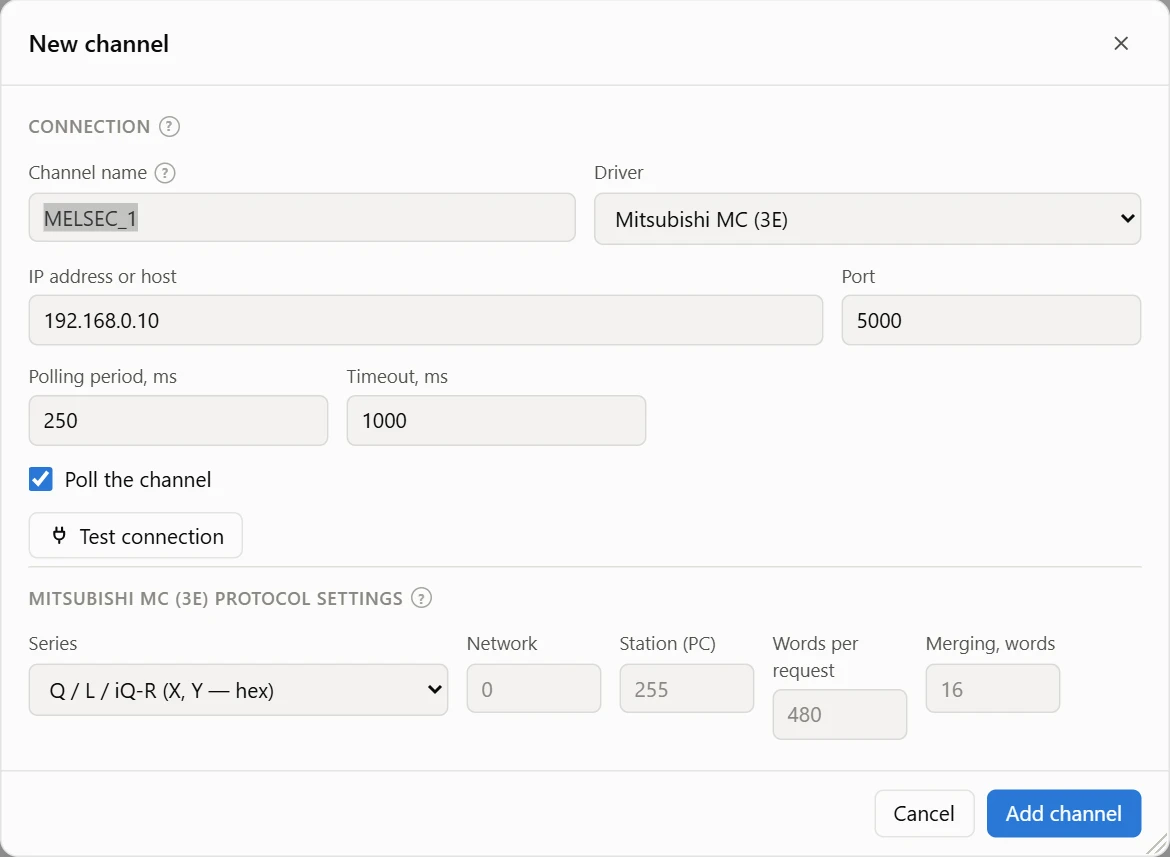
The Mitsubishi MC (3E) channel window.
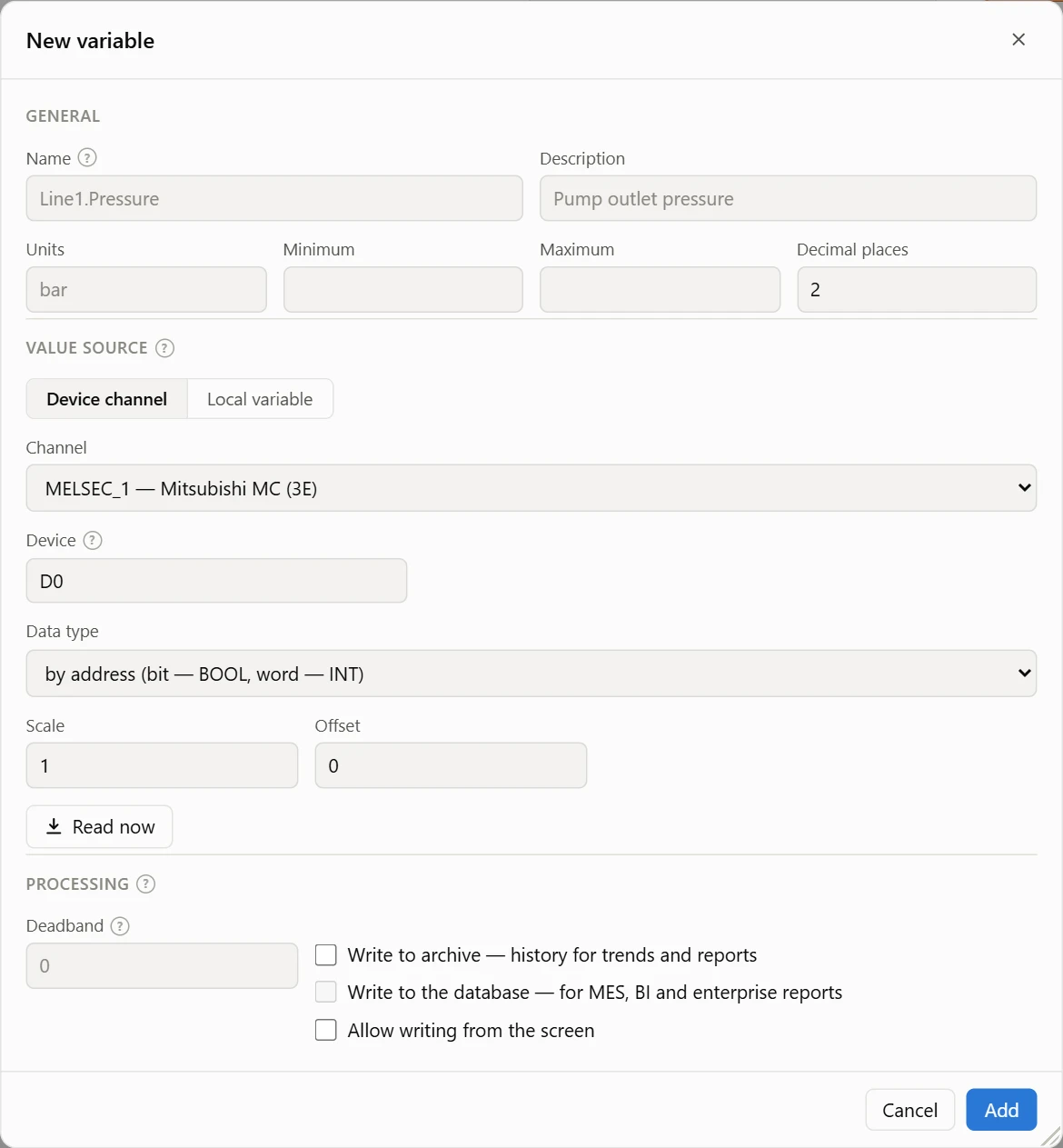
The window of a Mitsubishi MC (3E) channel variable.
Channel settings
Parameter
Values
Meaning
Connection
IP address or host
text e.g. 192.168.0.10
The device address on the network: 192.168.0.10 or a host name.
Port
number5000· default
The TCP or UDP port of the protocol; the default is the protocol standard one (filled in when the driver is chosen).
Polling period, ms
number250· default
How often to read all variables of the channel. Smaller — fresher values, but more load on the network and the PLC.
Timeout, ms
number1000· default
How long to wait for an answer. No answer — a communication error and a reconnection.
Poll the channel
checkbox on · default
Off — the channel does not connect (during commissioning or repairs); its variables have Bad quality.
Mitsubishi MC (3E) protocol settings
Series
Q / L / iQ-R (X, Y — hex) · defaultiQ-F FX5 (X, Y — octal)
by address (bit — BOOL, word — INT) · defaultBOOLINT (int16)UINT / WORD (uint16)DINT (int32)UDINT / DWORD (uint32)LINT (int64)ULINT (uint64)REAL (float32)LREAL (float64)STRING
How to read the value. “By address” — by the size letter or the device data.
Scale
number1· default
Engineering value = raw × scale + offset.
Offset
number0· default
Added after the scale.
EtherNet/IP (Logix)
EtherNet/IP (CIP) — Allen-Bradley ControlLogix, CompactLogix, GuardLogix, Micro800: tags by name, as in Studio 5000. ControlLogix — a route through the backplane and the CPU slot.
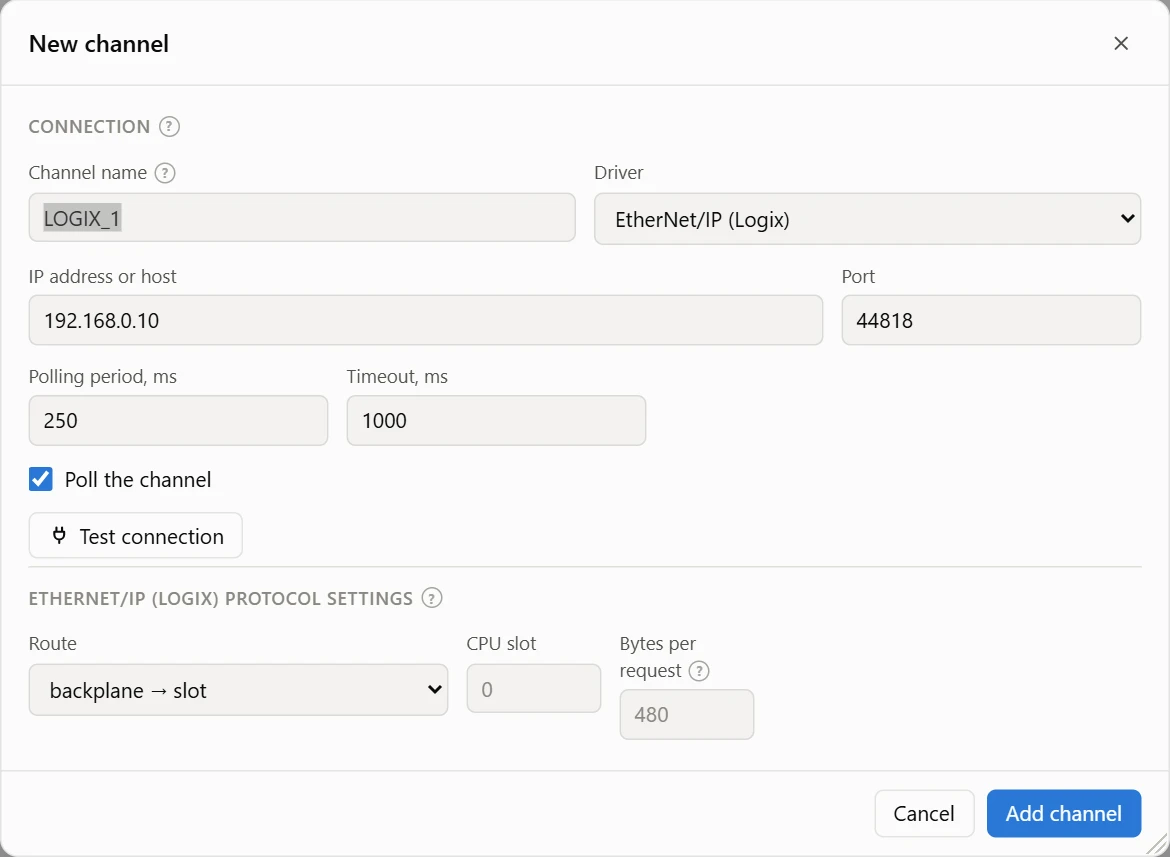
The EtherNet/IP (Logix) channel window.
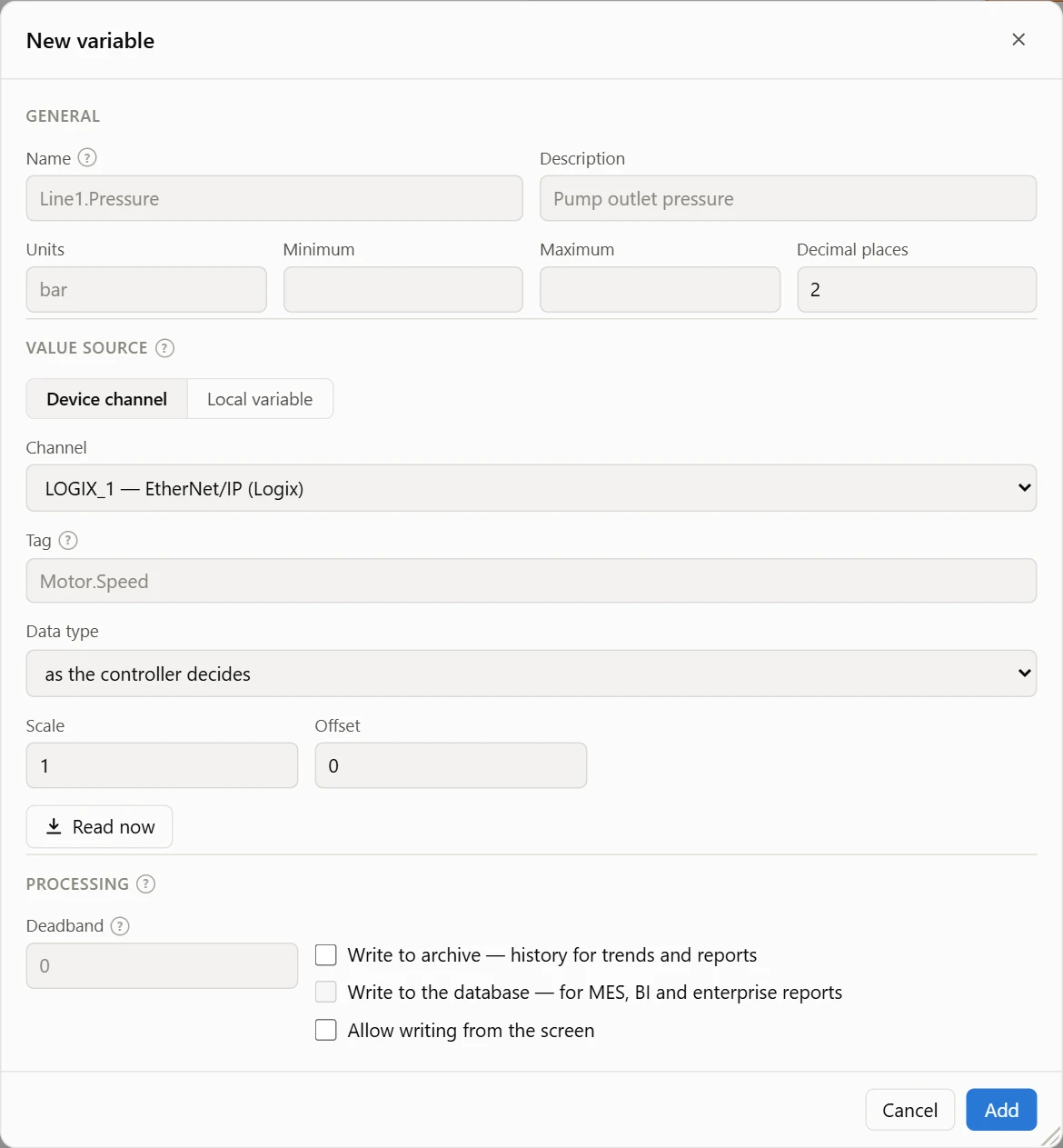
The window of a EtherNet/IP (Logix) channel variable.
Channel settings
Parameter
Values
Meaning
Connection
IP address or host
text e.g. 192.168.0.10
The device address on the network: 192.168.0.10 or a host name.
Port
number44818· default
The TCP or UDP port of the protocol; the default is the protocol standard one (filled in when the driver is chosen).
Polling period, ms
number250· default
How often to read all variables of the channel. Smaller — fresher values, but more load on the network and the PLC.
Timeout, ms
number1000· default
How long to wait for an answer. No answer — a communication error and a reconnection.
Poll the channel
checkbox on · default
Off — the channel does not connect (during commissioning or repairs); its variables have Bad quality.
as the controller decides · defaultBOOLINT (int16)UINT / WORD (uint16)DINT (int32)UDINT / DWORD (uint32)LINT (int64)ULINT (uint64)REAL (float32)LREAL (float64)STRING
How to read the value. “By address” — by the size letter or the device data.
Scale
number1· default
Engineering value = raw × scale + offset.
Offset
number0· default
Added after the scale.
KNX IP
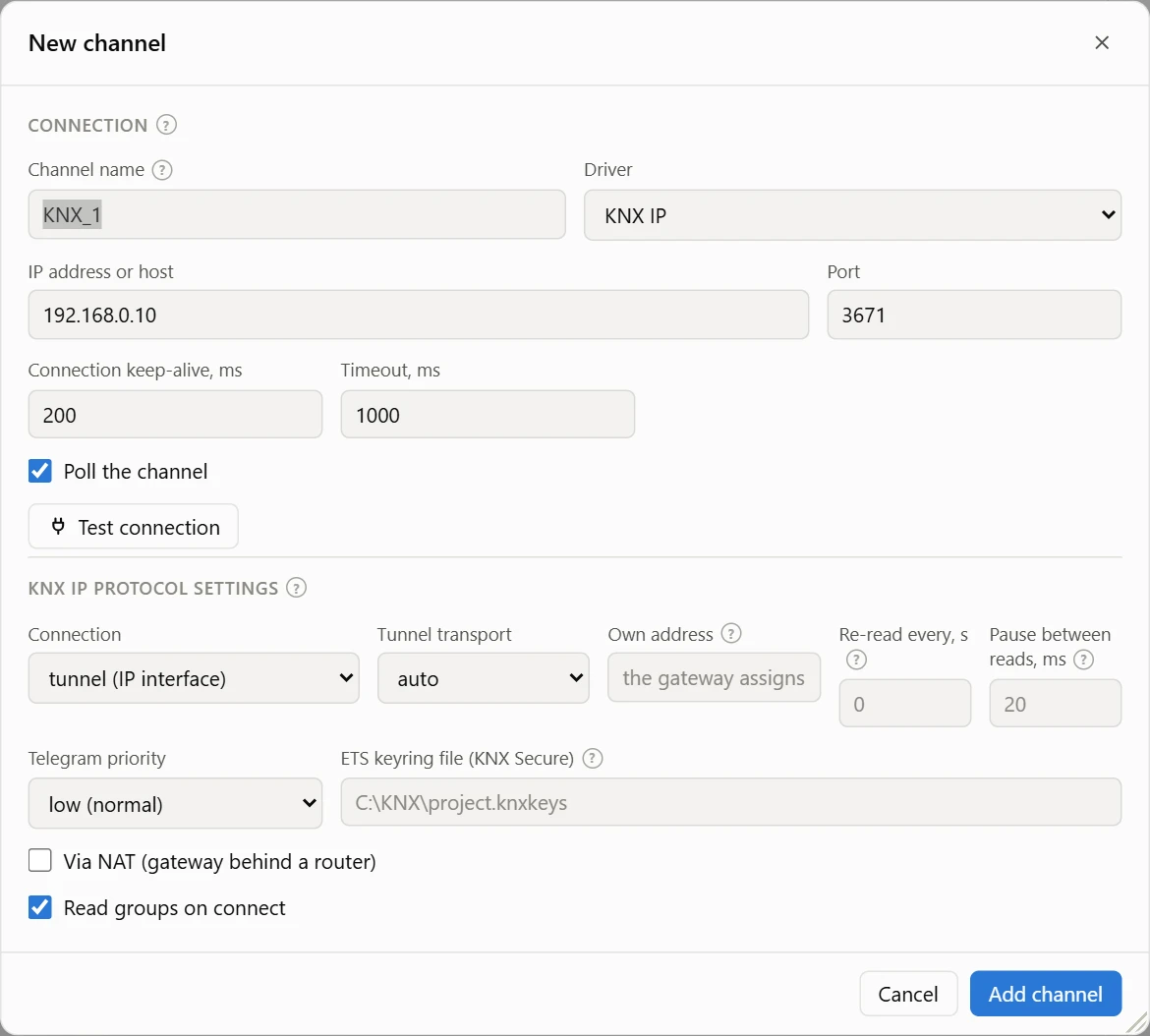
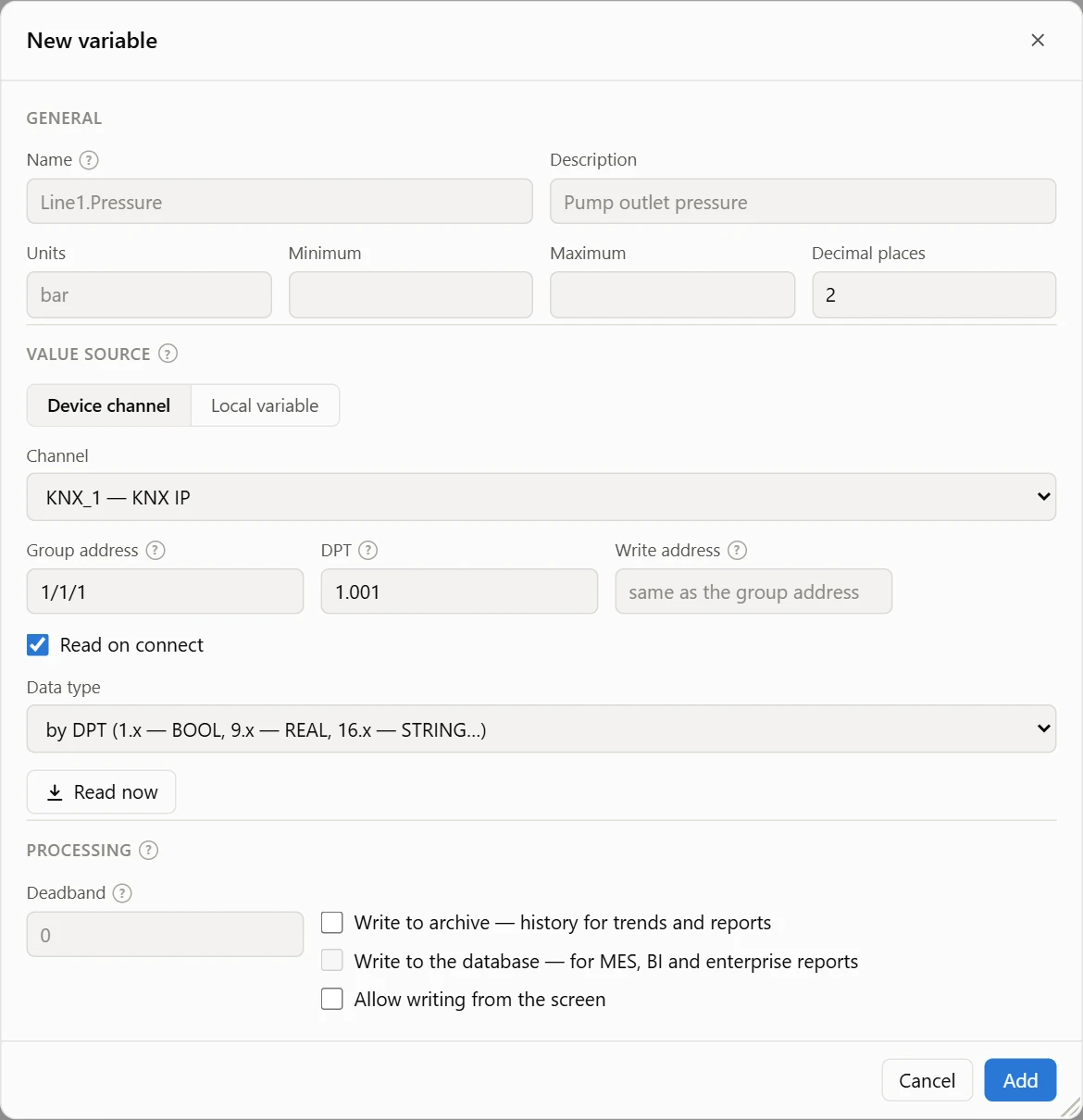
KNX IP — building automation through a KNX IP interface or router. Values arrive as bus telegrams; on connecting the groups are read. Group addresses and DPTs are imported from the ETS project (the Import from ETS button). KNX IP Secure and Data Secure are supported (an ETS keyring file). Windows only.
The KNX IP channel window.
The window of a KNX IP channel variable.
Channel settings
Parameter
Values
Meaning
Connection
IP address or host
text e.g. 192.168.0.10
The device address on the network: 192.168.0.10 or a host name.
Port
number3671· default
The TCP or UDP port of the protocol; the default is the protocol standard one (filled in when the driver is chosen).
Connection keep-alive, ms
number200· default
This protocol delivers values by itself; the period only serves connection checks and service traffic.
Timeout, ms
number1000· default
How long to wait for an answer. No answer — a communication error and a reconnection.
Poll the channel
checkbox on · default
Off — the channel does not connect (during commissioning or repairs); its variables have Bad quality.
How to read the value. “By address” — by the size letter or the device data.
DPT
What it is
Variable type
1.001
on/off
BOOL
5.001
percent 0…100
REAL
9.001
temperature, °C
REAL
14.056
power, W
REAL
16.000
text
STRING
20.102
heating mode
INT
HTTP (JSON) — web services
HTTP (JSON) brings in data from web services: weather, energy prices and rates, IIoT cloud platforms, REST APIs of equipment and building systems. Once per poll period Flexible SCADA requests (GET) the path of each variable and takes the needed field from the JSON response; variables with the same path share one request per cycle. Read-only.
Channel parameters
Parameter
What to set
IP address or host
the service address without https://: api.open-meteo.com
Port
443 — HTTPS, 80 — HTTP
HTTPS (secure connection)
on by default; clear it for a service on http://
Do not verify the service certificate
for a service on the internal network with its own (self-signed) certificate
Key header, Header value
when the service expects an API key in a header (Authorization: Bearer …, X-API-Key); the value is encrypted in the project
Poll period, ms
5–15 minutes is enough for weather (600 000 ms); at most once a second
Timeout, ms
how long to wait for the service to answer
Variable address
Field
What it is
Example
Request path
everything after the host: path and parameters (a space is %20)
the JSON path: names with dots, array items — [0]; empty — the whole response
current.temperature_2m, daily.sunset[0]
Data type
a number, a boolean (true/false, 0/1) or a string
STRING — sunrise time
Scale, offset
unit conversion
km/h → m/s: 1/3.6
Weather without a key: the Open-Meteo service — host api.open-meteo.com, port 443, period 600 000 ms; a variable with the path /v1/forecast?latitude=55.7558&longitude=37.6173¤t=temperature_2m and the field current.temperature_2m gives the temperature in Moscow. The “Pine Quarter residential complex” demo project is built this way.
A non-2xx response, a missing field or “not a number” — the variable gets bad quality with the reason in the Status column (response 404, “the response has no field …”); the service does not answer — the channel is “no connection” and reconnects. On a site without internet access the channel is simply offline.
Simulator
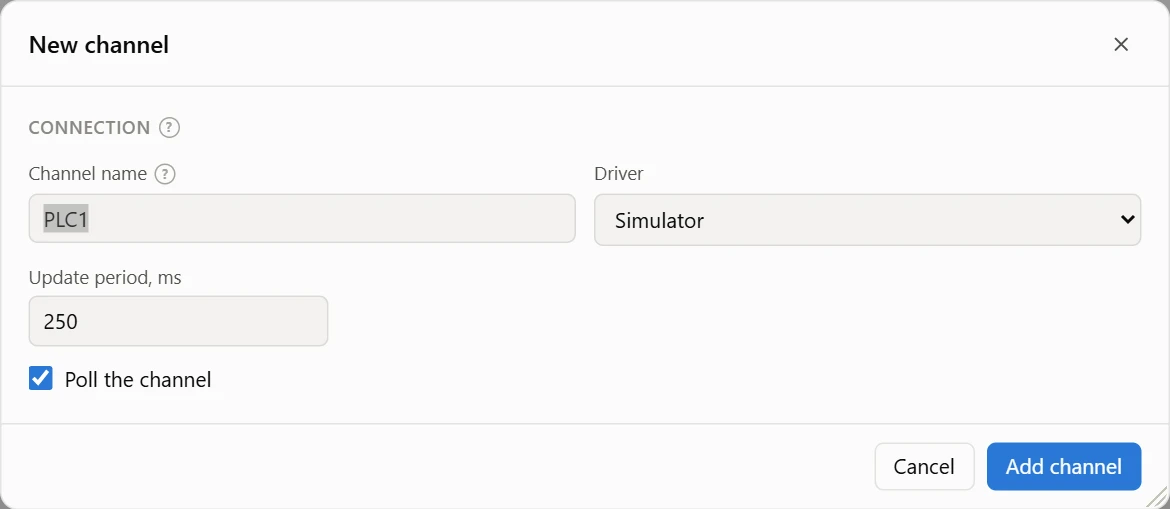
Simulator generates signals by formulas — to debug windows, alarms and trends without a device. The functions and their parameters are on the Variables and channels page.
The Simulator channel window.
Channel settings
Parameter
Values
Meaning
Connection
Update period, ms
number250· default
Poll the channel
checkbox on · default
Off — the channel does not connect (during commissioning or repairs); its variables have Bad quality.