Variables and channels
A variable (tag) is one process value: a pressure, a pump state, a setpoint. It comes from a device channel or lives on the server as a local variable. Here — every variable setting and what it means.
Channels
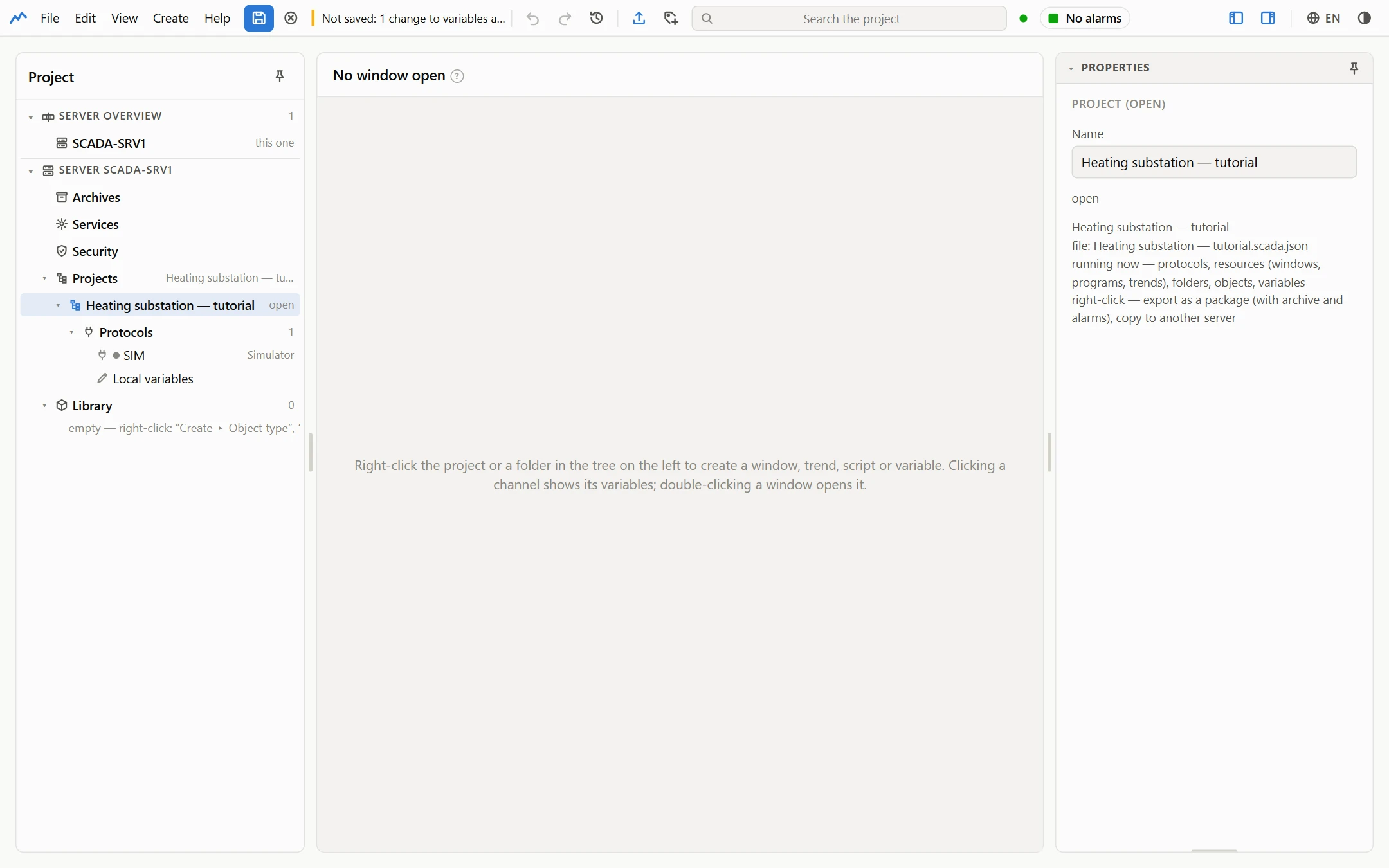
A channel is a connection to one device or data server. It is created with a right-click on the project → Create → Channel (protocol) and lives in the Protocols branch. A click on a channel opens the table of its variables, a double-click — the channel window. The settings of every protocol are on the Protocols page.
 1
Every channel has system variables — they can be shown on windows and used in alarms:
| Variable | Value |
|---|---|
_Sys.<channel>.Online | 1 — the channel is connected, 0 — not |
_Sys.<channel>.CycleMs | duration of the last polling cycle, ms |
_Sys.<channel>.Errors | the number of communication errors since the channel started |
The channel variable table
The table shows the variables of the channel (or of all channels — click “Protocols”) with live values, quality and time. Above the table are a search by name, description and address, the Tree | List switch (branches by name parts or full names) and buttons:
| Button | What it does |
|---|---|
| + Variable | a new variable of the selected channel |
| Channel settings | the channel window (the same — double-click the channel in the tree) |
| Modbus scanner | polls a range of addresses of a Modbus device and shows where there is data — the chosen ones are added as variables |
| Browse OPC UA | the address space of an OPC UA server: pick nodes — variables are created with the NodeId, type and description |
| Import from DB | for an S7 channel: variables of a data block from a TIA Portal source (.db) or STEP 7 (.awl) |
| Import from ETS | for a KNX channel: group addresses from an ETS export (XML or CSV) |
| To archive / No archive | appear when row checkboxes are ticked: turn the archive on or off for the selected (what is already written stays until it expires) |
| Delete selected | delete the ticked variables |
| CSV ▾ | export the table to CSV for Excel or load it from CSV (by column headers, as in the export): this is how variables are created by the hundred |
The checkbox in the header ticks everything found by the search, Shift+click on a checkbox ticks a range of rows. At the end of a row are the “Edit”, “Duplicate to the next address” and “Delete” icons: a copy gets the next name and the next address (DB1.DBW4 → DB1.DBW6, IOA 10 → 11).
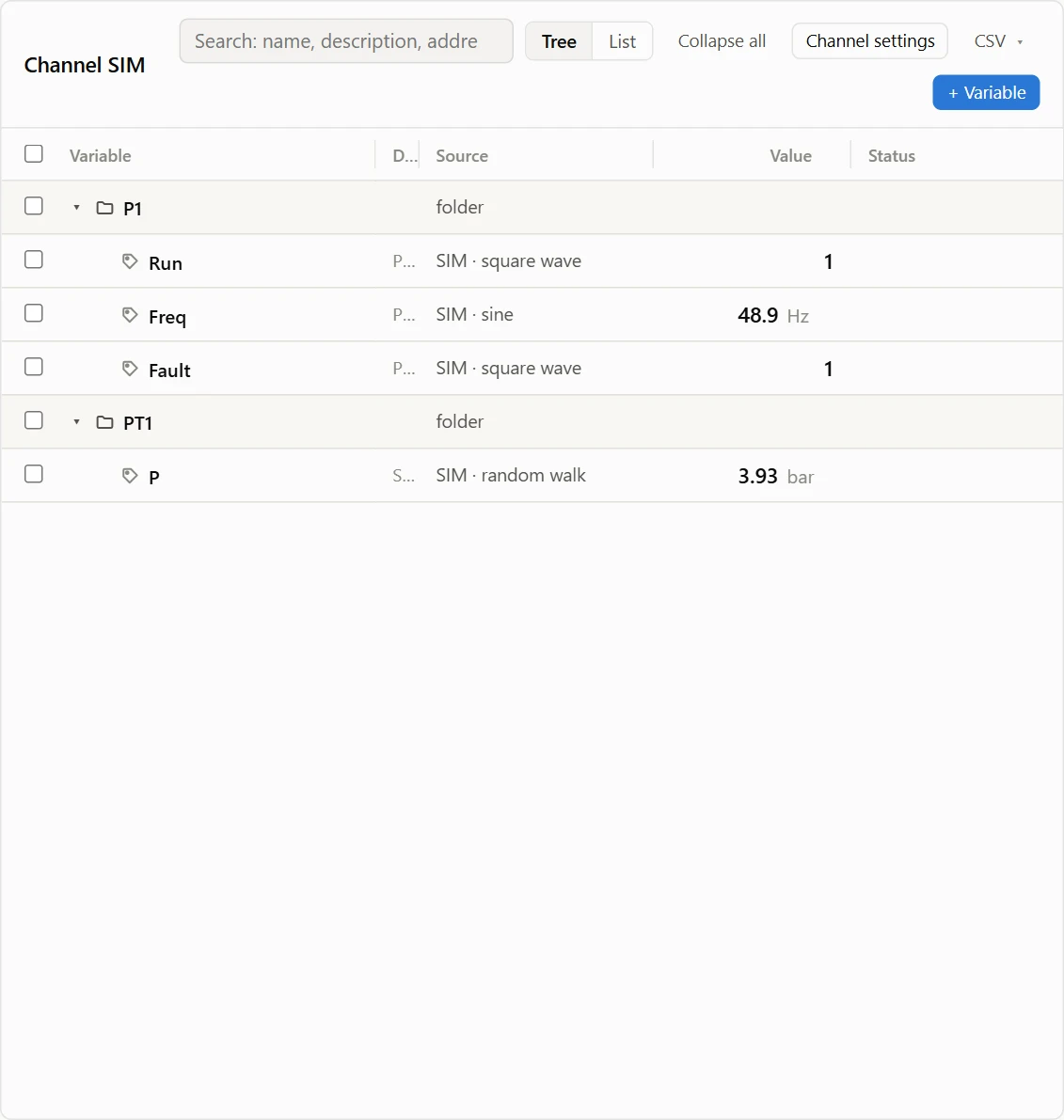
Table cells are selected with the mouse as in Excel: Ctrl+C copies them, Ctrl+V pastes from Excel — a quick way to edit addresses and descriptions of many variables.
The variable window
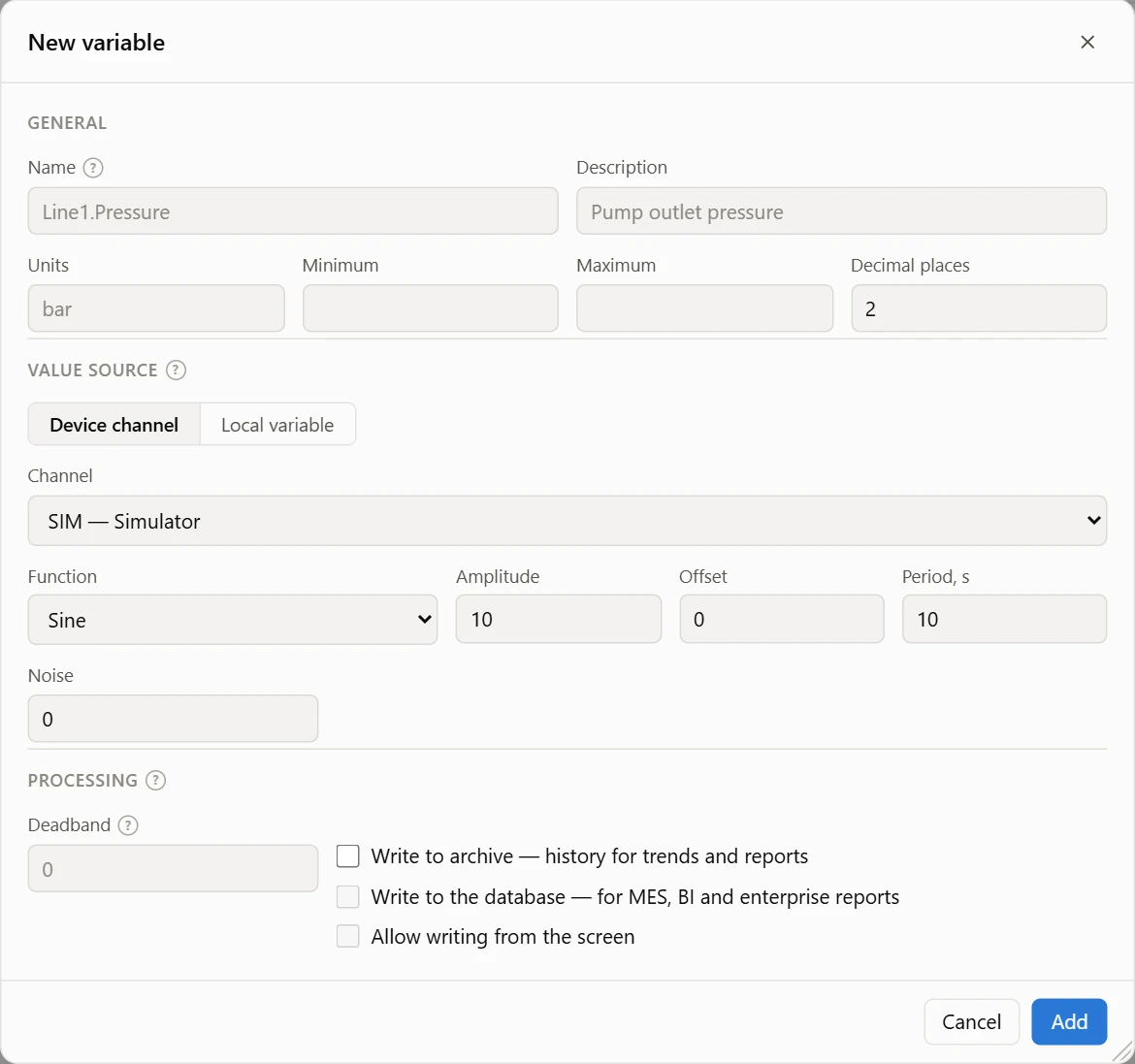
A double-click on a variable (or + Variable) opens its window. The “General” and “Processing” sections are the same for every variable; “Value source” depends on the channel protocol.
| Parameter | Values | Meaning |
|---|---|---|
| Name | text e.g. Line1.Pressure | A unique name in the project. Letters (Latin and Cyrillic), digits, _ . -; the first character is a letter, a digit or _. Dots split the name into tree branches: Line1.Pump.Run — branch “Line1” → “Pump” → “Run”. Windows, trends, alarms and programs refer to the variable by this name. |
| Description | text | What the value is — shown in tips, tables, to the operator, in reports and in alarm texts ({description}). |
| Units | text | Units: “bar”, “°C”, “%”. Shown next to the value on windows and trends; a trend draws variables with different units on different scales. |
| Minimum | number | The lower bound of the range: the scale of an analog indicator and a trend, a check of values entered on the screen. Empty — unlimited. |
| Maximum | number | The upper bound of the range. Empty — unlimited. |
| Decimal places | number 2 · default | How many digits to show after the decimal point: 0 — an integer, 2 — 4.25. Storage and the archive are not affected. |
Value source
The switch at the top of the section: Device channel — the value is read from the channel at an address; Local variable — the value lives on the server (see below). The Channel field is a project channel; next come the address fields of that protocol (see Protocols). The Read now button reads the value at the address immediately — a check without Save.
Numeric variables of protocols have scale and offset: engineering value = raw × scale + offset. For example, a 4–20 mA sensor in a register 0…27648 gives 0…10 bar with a scale of 0.000361690. Writing from the screen converts back.
Processing
| Parameter | Values | Meaning |
|---|---|---|
| Deadband | number 0 · default | A change smaller than this threshold does not count as a change: the value is not sent to clients and programs. Removes the “chatter” of analog signals. Empty or 0 — any change. |
| Write to archive — history for trends and reports | checkbox off · default | Values are written to the server archive: trends show the past, reports calculate averages and totals. Without it a trend only shows values from the moment it was opened. Archiving settings — on the Value archive page. |
| Write to the database — for MES, BI and enterprise reports | checkbox off · default | |
| Allow writing from the screen | checkbox off · default | The operator can change the value with buttons and input fields (if their role has the “Control” permission). Without it input elements show the value but do not write. |
Simulator
The Simulator channel generates values by a formula — to build and check windows, alarms and trends without a device. The value is recalculated with the channel update period.
| Parameter | Values | Meaning |
|---|---|---|
| Function | Sine · defaultSawtoothSquare waveRandom walkCounter | The waveform (see the table below). |
| Amplitude | number 10 · default | The span: for the sine — the deviation from the offset, for the sawtooth and the square wave — the height, for the random walk — how far it may move from the offset. |
| Offset | number 0 · default | The average value (sine, random walk) or the lower one (sawtooth, square wave). |
| Period, s | number 10 · default | The duration of one signal cycle. At least 0.1 s. |
| Noise | number 0 · default | A random addition of ± noise to every value — a “living” sensor. |
| Function | Formula | Example |
|---|---|---|
| Sine | offset + amplitude · sin(2π · t / period) | frequency 45 ± 5 Hz: amplitude 5, offset 45 |
| Sawtooth | offset + amplitude · (fraction of the period): rises from the offset to offset + amplitude and drops back | tank level, filling and draining |
| Square wave | the first half of the period — offset + amplitude, the second — offset | a digital 1/0 signal: amplitude 1, offset 0 |
| Random walk | every step — a random shift of ±2.5 % of the amplitude, within offset ± amplitude | pressure, temperature |
| Counter | +1 every step | a pulse counter, operating hours |
Local variables
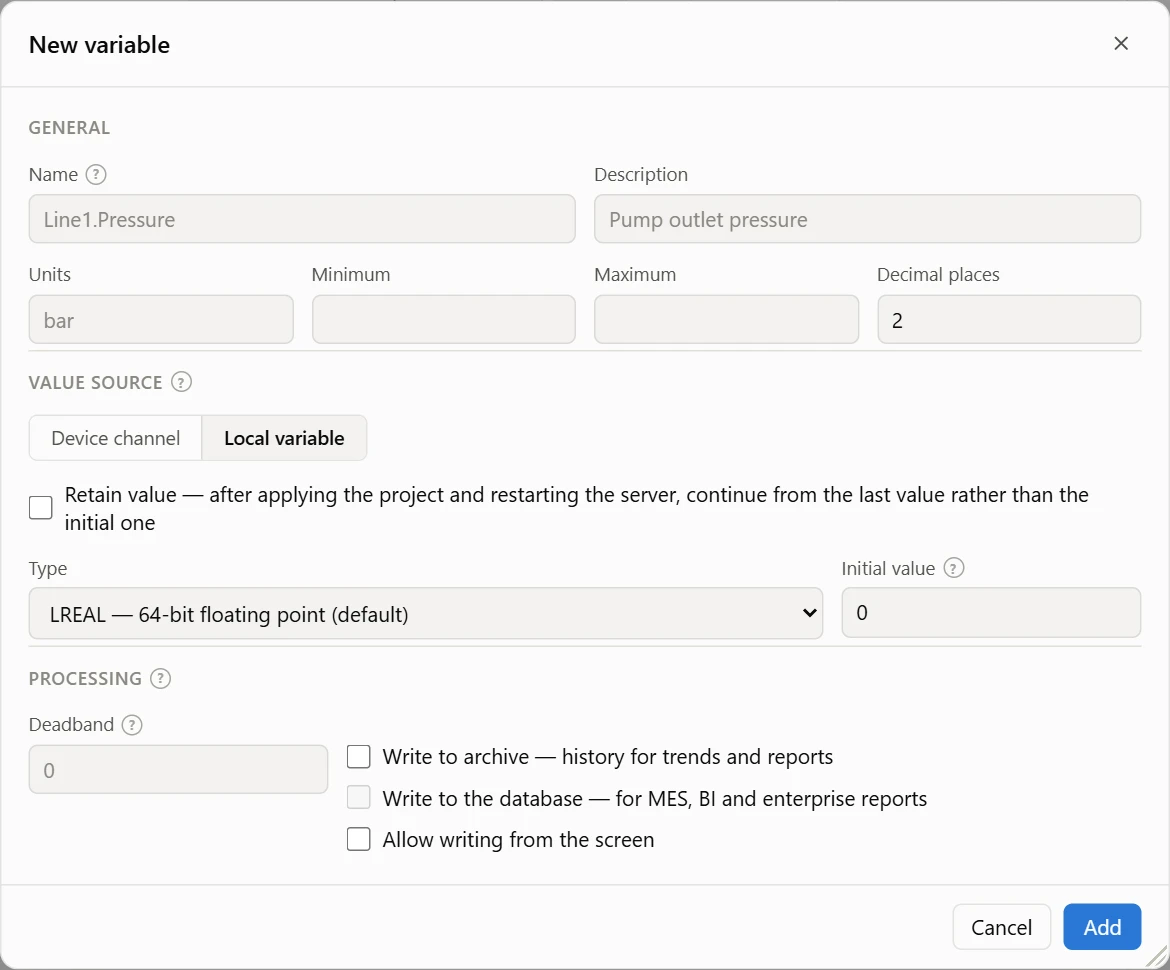
A local variable lives in the server core without a device: a setpoint, an operating mode, a calculation result, a flag. It is visible in the whole project — on windows, trends, in alarms and in C#, ST and FBD programs (there — with its own IEC 61131-3 type). It is created with the Local variable button in the menu bar, right-click a folder → Create → Local variable, or with the “Local variable” switch in the variable window.
| Parameter | Values | Meaning |
|---|---|---|
| Retain value — after applying the project and restarting the server, continue from the last value rather than the initial one | checkbox off · default | The last value survives a server restart and Save — for setpoints and modes set by the operator. Without it, after a restart — the initial value. |
| Type | BOOL — boolean (0 / 1)INT — 16-bit integerUINT (WORD) — 16-bit unsigned integerDINT — 32-bit integerUDINT (DWORD) — 32-bit unsigned integerREAL — 32-bit floating pointLREAL — 64-bit floating point (default) · defaultSTRING — string | The IEC 61131-3 type. A value written from the screen or a program is converted to the type: 3.7 becomes 4 in an INT, any non-zero value becomes TRUE in a BOOL. |
| Initial value | number 0 · default | The value at project start (FALSE or TRUE for BOOL, the initial text for STRING). |
| Type | Range | Used for |
|---|---|---|
| BOOL | 0 / 1 (FALSE / TRUE) | flags, commands, on/off modes |
| INT | −32,768 … 32,767 | counters, mode numbers |
| UINT (WORD) | 0 … 65,535 | status words, bit masks |
| DINT | −2,147,483,648 … 2,147,483,647 | large counters |
| UDINT (DWORD) | 0 … 4,294,967,295 | double words, masks |
| REAL | ±3.4·1038, 7 significant digits | setpoints, calculations |
| LREAL | ±1.8·10308, 15 significant digits | the default: any number |
| STRING | up to 10,000 characters | text: a recipe name, a message; not archived |
Value quality
Every value has a quality, as in OPC UA:
| Quality | What it means | How it looks |
|---|---|---|
| Good | the value came from the device and is valid | normal appearance |
| Uncertain | doubtful: the device reported a sensor fault, the value is stale | the value is paler, the tip says why |
| Bad | no connection to the device, address not found, read error | the value is crossed out or “—”, elements get a frame |
Object variables (Substation.CircPump1.Run) are created by the object itself: their name, type, units and binding are set by the object and its type. In the window of such a variable only the archive, the deadband and value retention can be changed. Details — Objects and types.